AnimatedSwitcher
Purpose
The old child leaves as the new one arrives when the value changes.
Signature
pub struct AnimatedSwitcher<Msg = crate::callback::Callback> { .. }

impl AnimatedSwitcher {
    pub fn new<T, W>(duration: f32, value: T, build: impl Fn(&T) -> W + 'static) -> Self
    where
        T: PartialEq + 'static,
        W: Widget<Msg> + 'static,;
}
Example
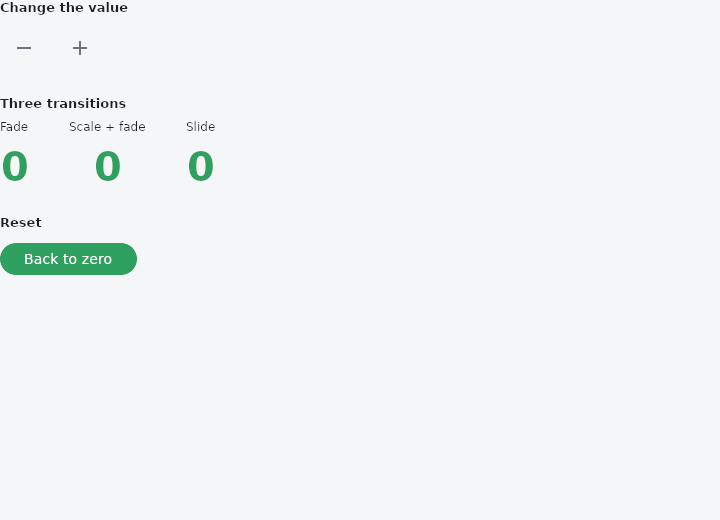
From frus-examples/widgets/src/features/animation/widgets/animated_switcher.rs:
//! `AnimatedSwitcher` — when the value it shows changes, the old child leaves as the new
//! one arrives: a fade by default, or any transition you hand it.
//!
//! It is given the **value** a child is made from, not the child: values that compare
//! equal are the same child and nothing moves; a different value is a switch.

use frus::{
    component, Align, AnimatedSwitcher, Button, Column, Curve, FadeTransition, FontWeight,
    IconButton, Icons, Row, ScaleTransition, SlideTransition, Text, Widget, Wrap,
};

use crate::common::shared::{section, sections};

pub fn example() -> Box<dyn Widget> {
    Box::new(component(|cx| {
        let count = cx.use_state(|| 0_i32);
        let n = count.get();
        let primary = cx.theme().primary;

        // One number, three ways to change it on screen.
        let number = move |value: &i32| {
            Text::new(value.to_string())
                .size(40.0)
                .weight(FontWeight::Bold)
                .color(primary)
        };

        let (down, up) = (count.clone(), count.clone());
        let controls = Row::new()
            .spacing(8.0)
            .cross_axis_alignment(Align::Center)
            .child(
                IconButton::new(Icons::REMOVE)
                    .label("Decrement")
                    .on_press(move || down.update(|n| *n -= 1)),
            )
            .child(
                IconButton::new(Icons::ADD)
                    .label("Increment")
                    .on_press(move || up.update(|n| *n += 1)),
            );

        let shown = |title: &str, switcher: AnimatedSwitcher| {
            Column::new()
                .spacing(8.0)
                .cross_axis_alignment(Align::Center)
                .child(Text::new(title).size(12.0))
                .child(switcher)
        };

        sections(vec![
            Box::new(section("Change the value", controls)),
            Box::new(section(
                "Three transitions",
                Wrap::new()
                    .gap(40.0)
                    .run_gap(16.0)
                    // The default: the old child fades out as the new one fades in.
                    .child(shown("Fade", AnimatedSwitcher::new(0.3, n, number)))
                    // `transition` is handed the child and its progress (1 = in place,
                    // 0 = gone), for the arriving child and the leaving one alike.
                    .child(shown(
                        "Scale + fade",
                        AnimatedSwitcher::new(0.3, n, number)
                            .switch_in_curve(Curve::ease_out())
                            .transition(|child, t| {
                                ScaleTransition::new(0.5 + 0.5 * t, FadeTransition::new(t, child))
                            }),
                    ))
                    // Any explicit transition fits: here the digits slide up into place.
                    .child(shown(
                        "Slide",
                        AnimatedSwitcher::new(0.3, n, number).transition(|child, t| {
                            SlideTransition::new(0.0, 1.0 - t, FadeTransition::new(t, child))
                        }),
                    )),
            )),
            Box::new(section(
                "Reset",
                Button::new("Back to zero").on_press(move || count.set(0)),
            )),
        ])
    }))
}
Properties
| Method | Argument | Effect |
|---|---|---|
.reverse_duration() | seconds: f32 | How long a child takes to leave, when it is not as long as one takes to arrive. |
.switch_in_curve() | curve: Curve | The curve a child arrives on. |
.switch_out_curve() | curve: Curve | The curve a child leaves on, read as its progress falls from where it was to nothing. Linear by default. |
.transition() | transition: impl Fn(Box<dyn Widget<Msg>>, f32) -> W + 'static | How a child arrives and leaves: handed the child and its progress — 1 in place, 0 gone — it returns the child as it should be drawn at that point. A fade by default. |
.layout() | layout: impl Fn(Vec<Box<dyn Widget<Msg>>>) -> W + 'static | Where the children go while more than one is showing: handed them oldest first, the arriving one last, it returns what holds them. By default they overlap, centred in a box as big as the largest. |
Behaviour
Moves between two different children when the value it shows changes: the old one leaves as the new one arrives — a fade by default.
use frus_widgets::{AnimatedSwitcher, Text};

let count = 3;
let _shown: AnimatedSwitcher<()> =
    AnimatedSwitcher::new(0.25, count, |n: &i32| Text::new(n.to_string()));
It is handed the value a child is made from rather than the child, because a value is what can be kept from one frame to the next — see the module documentation. Two values that compare equal are the same child: nothing moves. A value that differs is a switch, and the child that was showing leaves from wherever it had got to.
AnimatedSwitcher::transitionsays how a child arrives and leaves. It is handed the child and its progress, and any explicit transition fits:.transition(|child, t| ScaleTransition::new(t, child)).AnimatedSwitcher::layoutsays where the children go while two are showing. By default they overlap, centred, in a box as big as the largest of them.- The first value is shown as it is, with no transition: an implicit animation adopts what it is given on the frame it appears, here as everywhere.
An absent child is a value like any other: switch over an Option and build an empty box for None, and a child fades out to nothing.
See also
- AnimatedFractionallySizedBox: a fraction of the room, moving to each new fraction.
- AnimatedSize: a box that follows its child's size over time instead of jumping.
- AnimatedCrossFade: cross-fades between two known children, the box moving between their sizes.
- Fade, Slide, Scale & Size transitions: explicit transitions driven by a number the app owns: an AnimationController.
- DecoratedBoxTransition & DefaultTextStyleTransition: a whole decoration or text style, part of the way from one to another.
- The guide: Animation
- API reference:
AnimatedSwitcher
Source: crates/frus-widgets/src/switcher.rs @ e6fba33f5b42