MenuBar and SubmenuButton
Purpose
A desktop window's menus along the top, with submenus inside them.
Signature
pub struct MenuBar<Msg = crate::callback::Callback> { .. }

impl MenuBar {
    pub fn new<R1: crate::callback::IntoMsg<Msg>>(
        path: &MenuPath,
        on_path: impl Fn(MenuPath) -> R1 + 'static,
    ) -> Self;
}
pub struct SubmenuButton<Msg = crate::callback::Callback> { .. }

impl SubmenuButton {
    pub fn new(label: impl Into<String>) -> Self;
}
Example
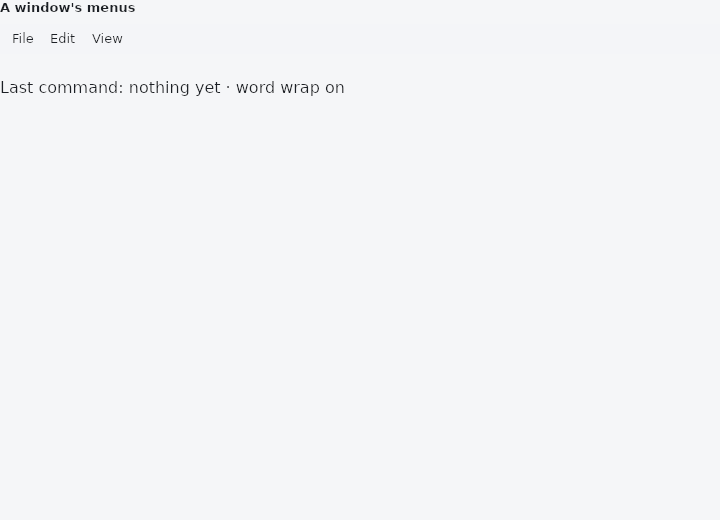
From frus-examples/widgets/src/features/buttons/widgets/menu_bar.rs:
//! `MenuBar`, `SubmenuButton` and `MenuPath` — the File / Edit / View menus along the
//! top of a desktop window, with submenus inside them.

use frus::{
    Callback, MenuBar, MenuItem, MenuPath, State, StateContext, StatefulWidget, SubmenuButton,
    Text, Widget,
};

use crate::common::shared::{section, sections};

pub fn example() -> Box<dyn Widget> {
    Box::new(MenuBarDemo.into_widget())
}

struct MenuBarDemo;

/// Which menu is open is a **path** — the menu on the bar, then the submenu inside it —
/// kept by the application like any other state.
struct MenuBarDemoState {
    path: MenuPath,
    last: String,
    word_wrap: bool,
}

impl MenuBarDemoState {
    fn chose(&mut self, what: &str) {
        self.last = what.to_string();
        self.path = MenuPath::closed();
    }
}

impl StatefulWidget for MenuBarDemo {
    type State = MenuBarDemoState;

    fn create_state(&self) -> MenuBarDemoState {
        MenuBarDemoState {
            path: MenuPath::closed(),
            last: "nothing yet".into(),
            word_wrap: true,
        }
    }
}

impl State for MenuBarDemoState {
    type Widget = MenuBarDemo;

    fn build(&self, cx: &StateContext<Self>) -> Box<dyn Widget> {
        let pick = |what: &'static str| -> Callback {
            cx.callback(move |s: &mut MenuBarDemoState| s.chose(what))
        };

        let file = SubmenuButton::new("File")
            .item(MenuItem::new("New", pick("New")).shortcut("Ctrl+N"))
            .item(MenuItem::new("Open…", pick("Open")).shortcut("Ctrl+O"))
            // A row that opens a menu beside this one.
            .submenu(
                SubmenuButton::new("Open recent")
                    .item(MenuItem::new("notes.txt", pick("notes.txt")))
                    .item(MenuItem::new("todo.md", pick("todo.md"))),
            )
            .divider()
            .item(MenuItem::new("Quit", pick("Quit")));
        let edit = SubmenuButton::new("Edit")
            .item(MenuItem::new("Undo", pick("Undo")).shortcut("Ctrl+Z"))
            .item(MenuItem::new("Redo", pick("Redo")).enabled(false));
        let view = SubmenuButton::new("View").item(MenuItem::checked(
            "Word wrap",
            self.word_wrap,
            cx.callback(|s: &mut MenuBarDemoState| {
                s.word_wrap = !s.word_wrap;
                s.path = MenuPath::closed();
            }),
        ));

        // The bar reports the path it should have next — a menu opened, moved to,
        // or everything closed — and the handler stores it.
        let bar = MenuBar::new(
            &self.path,
            cx.handler(|s: &mut MenuBarDemoState, path: MenuPath| s.path = path),
        )
        .menu(file)
        .menu(edit)
        .menu(view);

        sections(vec![
            Box::new(section("A window's menus", bar)),
            Box::new(Text::new(format!(
                "Last command: {} · word wrap {}",
                self.last,
                if self.word_wrap { "on" } else { "off" }
            ))),
        ])
    }
}
Properties
| Type | Method | Argument | Effect |
|---|---|---|---|
MenuBar | .height() | height: f32 | How tall the bar is. Unset, the theme's, then 30 on a desktop and 48 on a phone. |
MenuBar | .background() | color: Color | The bar's surface. Unset, the theme's, then surface_container. |
MenuBar | .padding() | padding: Insets | The room at the bar's ends, around the words. |
MenuBar | .item_padding() | padding: Insets | The room either side of a word. |
MenuBar | .text_style() | style: TextStyle | The words' type. Unset, the theme's, then 13 px on a desktop and label_large on a phone. |
MenuBar | .foreground_color() | color: Color | The words' colour. Unset, the theme's, then on_surface. |
MenuBar | .highlight_color() | color: Color | The highlight behind the word under the pointer and the word whose menu is open. Unset, the theme's, then on_surface over the bar. |
MenuBar | .item_radius() | radius: f32 | The highlight's corners. Unset, the theme's, then 4 on a desktop. |
MenuBar | .item_inset() | inset: f32 | The room the highlight keeps above and below it, inside the bar. |
MenuBar | .menu_style() | menus: crate::MenuTheme | The menus the bar opens: their rows, their type, their panel. What it says outranks the theme's bar menus, a desktop's menus and the application's MenuTheme. |
MenuBar | .menu() | menu: SubmenuButton<Msg> | Adds a menu to the bar. |
SubmenuButton | .item() | item: MenuItem<Msg> | Adds a row. |
SubmenuButton | .submenu() | submenu: SubmenuButton<Msg> | Adds a row that opens submenu beside this menu. |
SubmenuButton | .divider() | — | Adds the rule between two groups. |
SubmenuButton | .enabled() | enabled: bool | Whether the menu can be opened. A disabled one is still shown, greyed. |
Behaviour
MenuBar
The menus along the top of a window: File, Edit, View.
The application holds which one is open as a MenuPath and is sent the new path whenever it should change:
- a press on a menu's word opens it, and a second press closes it;
- once one is open, moving the pointer onto another word opens that one instead, with no press;
- moving onto a row that opens a submenu opens it, and moving onto any other row of that menu closes it again;
- a press outside every open menu closes them all.
A row's own message is sent when it is pressed. Close the menus when you handle it (self.menu = MenuPath::closed()), as a PopupMenuButton's rows are closed: a press is one message, and it is the row's.
use frus_widgets::{MenuBar, MenuItem, MenuPath, SubmenuButton};

#[derive(Clone)]
enum Msg { Menu(MenuPath), Quit, Wrap }

let path = MenuPath::closed();
let bar = MenuBar::new(&path, Msg::Menu)
    .menu(SubmenuButton::new("File").item(MenuItem::new("Quit", Msg::Quit)))
    .menu(SubmenuButton::new("View").item(MenuItem::checked("Word wrap", true, Msg::Wrap)));
SubmenuButton
A menu: on a MenuBar, the word along the top and what drops from it; inside another menu, a row that opens a menu beside it.
Its rows are MenuItems: actions, ticked rows, rows with a shortcut shown, rules.
use frus_widgets::{MenuItem, SubmenuButton};

#[derive(Clone)]
enum Msg { New, Open, Recent(usize) }

let file: SubmenuButton<Msg> = SubmenuButton::new("File")
    .item(MenuItem::new("New", Msg::New).shortcut("Ctrl+N"))
    .item(MenuItem::new("Open…", Msg::Open))
    .divider()
    .submenu(
        SubmenuButton::new("Open recent")
            .item(MenuItem::new("notes.txt", Msg::Recent(0)))
            .item(MenuItem::new("todo.md", Msg::Recent(1))),
    );
See also
- PopupMenuButton & MenuItem: a list of actions floating over a button: icons, ticks, shortcuts and rules.
- MenuAnchor: a floating panel with any content, anchored to a widget.
- DropdownButton: a button showing the current choice, whose options float below it.
- DropdownMenu: a dropdown that looks like a text field and filters its choices as you type.
- BackButton, CloseButton & DrawerButton: icon buttons whose meaning is fixed: back, close, and the two drawers.
- The guide: Taking input
- API reference:
MenuBar - API reference:
SubmenuButton
Source: crates/frus-widgets/src/menubar.rs, crates/frus-widgets/src/menubar.rs @ e6fba33f5b42