AutofillGroup and AutofillHint
Purpose
Tell the platform what each field holds so it can be filled in.
Signature
pub struct AutofillGroup<Msg = crate::callback::Callback> { .. }

impl AutofillGroup {
    pub fn new(inner: impl Widget<Msg> + 'static) -> Self;
}
pub enum AutofillHint { .. }
Example
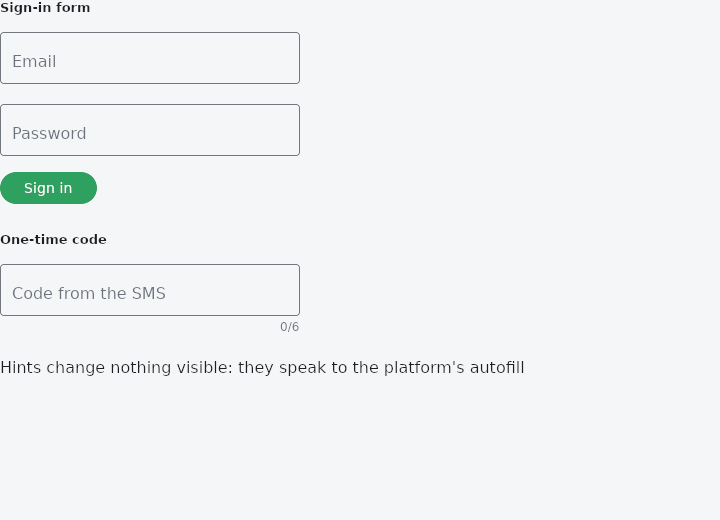
From frus-examples/widgets/src/features/inputs/widgets/autofill_group.rs:
//! `AutofillGroup` and `AutofillHint` — say what each field **holds** (a user name, a new
//! password, an SMS code) so that password managers and the system can fill it in, and
//! group a form's fields so that a username and its password are saved together.

use frus::{
    Align, AutofillGroup, AutofillHint, Button, Column, KeyboardType, State, StateContext,
    StatefulWidget, Text, TextField, Widget,
};

use crate::common::shared::{section, sections};

pub fn example() -> Box<dyn Widget> {
    Box::new(AutofillDemo.into_widget())
}

struct AutofillDemo;

#[derive(Default)]
struct AutofillDemoState {
    email: String,
    password: String,
    code: String,
    signed_in: bool,
}

impl StatefulWidget for AutofillDemo {
    type State = AutofillDemoState;

    fn create_state(&self) -> AutofillDemoState {
        AutofillDemoState::default()
    }
}

impl State for AutofillDemoState {
    type Widget = AutofillDemo;

    fn build(&self, cx: &StateContext<Self>) -> Box<dyn Widget> {
        // A field can be several things at once, best description first: this box takes
        // an email address that is also the user name.
        let form = Column::new()
            .spacing(12.0)
            .cross_axis_alignment(Align::Start)
            .child(
                TextField::new(&self.email)
                    .label("Email")
                    .keyboard_type(KeyboardType::Email)
                    .autofill([AutofillHint::Username, AutofillHint::Email])
                    .width(300.0)
                    .on_input(cx.handler(|s: &mut AutofillDemoState, t: String| s.email = t)),
            )
            .child(
                TextField::new(&self.password)
                    .label("Password")
                    .obscure(true)
                    .autofill([AutofillHint::Password])
                    .width(300.0)
                    .on_input(cx.handler(|s: &mut AutofillDemoState, t: String| s.password = t)),
            )
            .child(
                Button::new("Sign in")
                    .on_press(cx.callback(|s: &mut AutofillDemoState| s.signed_in = true)),
            );

        sections(vec![
            // The group is what tells the system these two fields are one credential.
            Box::new(section("Sign-in form", AutofillGroup::new(form))),
            // A one-time code: on a phone the code from an SMS is offered above the
            // keyboard.
            Box::new(section(
                "One-time code",
                TextField::new(&self.code)
                    .label("Code from the SMS")
                    .keyboard_type(KeyboardType::Number)
                    .autofill([AutofillHint::OneTimeCode])
                    .max_length(6)
                    .width(300.0)
                    .on_input(cx.handler(|s: &mut AutofillDemoState, t: String| s.code = t)),
            )),
            Box::new(Text::new(if self.signed_in {
                "Signed in (a password manager would offer to save this pair)"
            } else {
                "Hints change nothing visible: they speak to the platform's autofill"
            })),
        ])
    }
}
Properties
No builder methods: everything is set through the constructor.
Behaviour
AutofillGroup
The fields of one form, declared together so that the platform can fill them and save them as a set.
A transparent wrapper: it changes nothing about how its subtree is laid out or painted. What it does is answer, for every field inside it, which form is this part of — and a password with no username beside it is a credential a service cannot save.
AutofillHint
What a field is for: what an autofill service should put in it, and what it should learn from it when the form is submitted.
The catalogue is the useful part of the platform's, not all of it: what a sign-in, a sign-up, an address and a card payment need. A hint the list does not carry is a hint to add here, with its platform name and a test.
See also
- DateTimeRange: a date range over two months and a start and end time, for booking a slot.
- ColorPicker: a grid of colour swatches to pick from.
- The guide: Taking input
- API reference:
AutofillGroup - API reference:
AutofillHint
Source: crates/frus-widgets/src/autofill.rs, crates/frus-widgets/src/autofill.rs @ e6fba33f5b42