TextEditingController
Purpose
A field's text held outside the field, to read, fill and clear it from code.
Signature
pub struct TextEditingController { .. }

impl TextEditingController {
    pub fn new() -> Self;
    pub fn with_text(text: impl Into<String>) -> Self;
}
Example
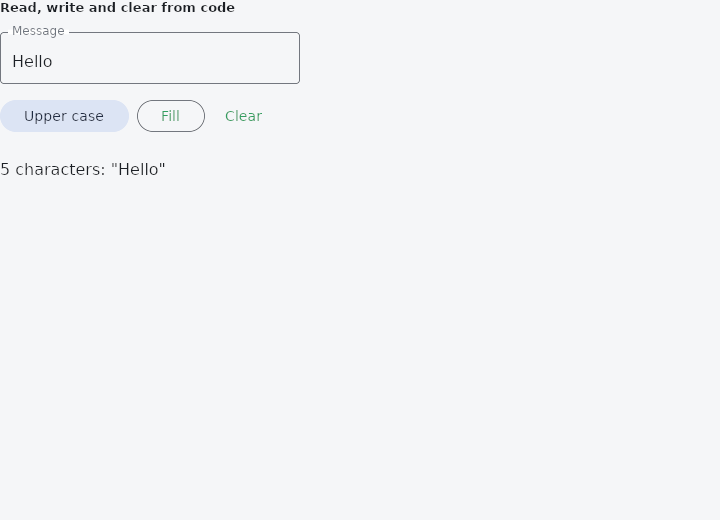
From frus-examples/widgets/src/features/inputs/widgets/text_editing_controller.rs:
//! `TextEditingController` — a field's text held outside the field, so the program can
//! read it, fill it and clear it. Made once and kept: `cx.use_text_controller(..)` in a
//! function component, or a field of a `State`.

use frus::{component, Align, Button, Column, Row, Text, TextField, Variant, Widget};

use crate::common::shared::{section, sections};

pub fn example() -> Box<dyn Widget> {
    // A function component: the hook gives back the same controller on every rebuild.
    Box::new(component(|cx| {
        let message = cx.use_text_controller("Hello");

        // Each button owns a clone of the handle; all of them reach the same text.
        let (shout, clear, fill) = (message.clone(), message.clone(), message.clone());

        let field = TextField::new("")
            .label("Message")
            .width(300.0)
            // `controller` sets both the value and `on_input`: typing writes into it.
            .controller(&message);

        let buttons = Row::new()
            .spacing(8.0)
            .child(
                Button::new("Upper case")
                    .variant(Variant::Tonal)
                    .on_press(move || shout.set_text(shout.text().to_uppercase())),
            )
            .child(
                Button::new("Fill")
                    .variant(Variant::Outlined)
                    .on_press(move || fill.set_text("Filled by the program")),
            )
            .child(
                Button::new("Clear")
                    .variant(Variant::Text)
                    .on_press(move || clear.clear()),
            );

        sections(vec![
            Box::new(section(
                "Read, write and clear from code",
                Column::new()
                    .spacing(12.0)
                    .cross_axis_alignment(Align::Start)
                    .child(field)
                    .child(buttons),
            )),
            // Reading the controller is reading what the field shows.
            Box::new(Text::new(format!(
                "{} characters: \"{}\"",
                message.len(),
                message.text()
            ))),
        ])
    }))
}
Properties
No builder methods: everything is set through the constructor.
Behaviour
A text field's text, and the changes to it.
Cloning gives another handle to the same text.
See also
- TextField: a text input: labels, hints, errors, icons, passwords, several lines and filters.
- Form, Rule & ErrorSummary: validation as a plain function of the state, shown on the fields and in a summary.
- Autocomplete: a text field that suggests completions in a floating list.
- SearchBar: the raised pill an application searches from.
- The guide: Taking input
- API reference:
TextEditingController
Source: crates/frus-widgets/src/editing.rs @ e6fba33f5b42