FocusableActionDetector and KeyboardListener
Purpose
A custom control that answers the keyboard for itself.
Signature
pub struct FocusableActionDetector<Msg = crate::callback::Callback>(Wrapper<Msg>);

impl FocusableActionDetector {
    pub fn new(child: impl Widget<Msg> + 'static) -> Self;
}
pub struct KeyboardListener<Msg = crate::callback::Callback> { .. }

impl KeyboardListener {
    pub fn new(
        child: impl Widget<Msg> + 'static,
        on_key: impl Fn(KeyStroke) -> Option<Msg> + 'static,
    ) -> Self;
}
Example
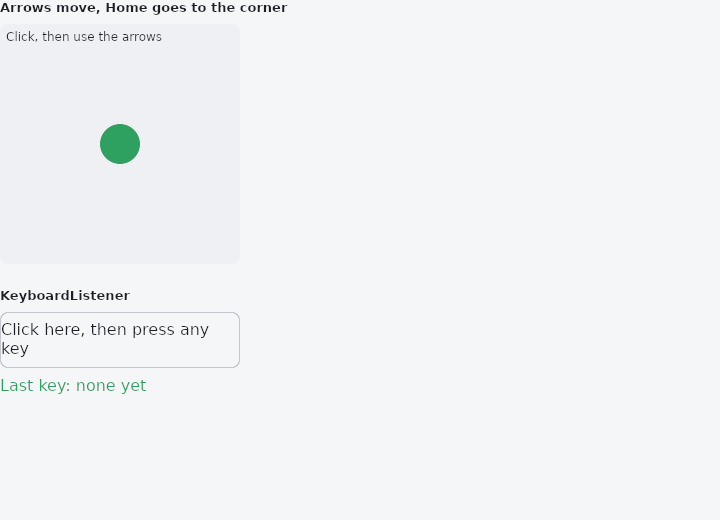
From frus-examples/widgets/src/features/interaction/widgets/keyboard.rs:
//! `FocusableActionDetector` and `KeyboardListener` — a custom control that answers the
//! keyboard for itself.
//!
//! `FocusableActionDetector` is a focus stop with its own key table: click it (or Tab to
//! it) and its keys work while it has the focus. `KeyboardListener` hands every keystroke
//! inside it to a closure — the escape hatch when a table cannot say what you need.

use frus::{
    Align, Alignment, Callback, Column, Container, Focus, FocusableActionDetector, Intent,
    KeyStroke, KeyboardListener, Positioned, ShortcutKey, Stack, StackFit, State, StateContext,
    StatefulWidget, Text, Widget,
};

use crate::common::shared::{section, sections};

pub fn example() -> Box<dyn Widget> {
    Box::new(Board.into_widget())
}

const GRID: i32 = 5;
const CELL: f32 = 48.0;
const HOME: Intent = Intent("move-home");

struct Board;

struct BoardState {
    /// The marker's cell, column then row.
    at: (i32, i32),
    last_key: String,
}

impl StatefulWidget for Board {
    type State = BoardState;

    fn create_state(&self) -> BoardState {
        BoardState {
            at: (2, 2),
            last_key: "none yet".to_string(),
        }
    }
}

impl BoardState {
    fn step(&mut self, dx: i32, dy: i32) {
        self.at.0 = (self.at.0 + dx).clamp(0, GRID - 1);
        self.at.1 = (self.at.1 + dy).clamp(0, GRID - 1);
    }
}

impl State for BoardState {
    type Widget = Board;

    fn build(&self, cx: &StateContext<Self>) -> Box<dyn Widget> {
        let scheme = &cx.theme().scheme;
        let side = CELL * GRID as f32;

        let board = Stack::new()
            .width(side)
            .height(side)
            .fit(StackFit::Expand)
            .layer(
                Container::new()
                    .radius(8.0)
                    .color(scheme.surface_container_high)
                    .alignment(Alignment::TOP_LEFT)
                    .padding(6.0)
                    .child(Text::new("Click, then use the arrows").size(12.0)),
            )
            .layer(
                Positioned::new(
                    Container::new()
                        .width(CELL - 8.0)
                        .height(CELL - 8.0)
                        .radius(CELL / 2.0)
                        .color(scheme.primary),
                )
                .left(self.at.0 as f32 * CELL + 4.0)
                .top(self.at.1 as f32 * CELL + 4.0),
            );

        let arrow = |key, dx, dy| (KeyStroke::new(key), cx.callback(move |s| s.step(dx, dy)));
        let detector = [
            arrow(ShortcutKey::Left, -1, 0),
            arrow(ShortcutKey::Right, 1, 0),
            arrow(ShortcutKey::Up, 0, -1),
            arrow(ShortcutKey::Down, 0, 1),
        ]
        .into_iter()
        // `on_key`: a keystroke straight to a handler, while this control has the focus.
        .fold(
            FocusableActionDetector::new(board),
            |detector, (stroke, run)| detector.on_key(stroke, run),
        )
        // Or through an intent, as `Shortcuts` and `Actions` do, in one widget.
        .bind(KeyStroke::new(ShortcutKey::Home), HOME)
        .action(HOME, cx.callback(|s| s.at = (0, 0)));

        // Every keystroke inside goes to the closure first. Answering `Some` takes the key;
        // `None` lets it carry on to the shortcuts around it.
        let heard = cx.handler(|s: &mut Self, stroke: KeyStroke| {
            let mut name = format!("{:?}", stroke.key);
            if stroke.shift {
                name = format!("Shift+{name}");
            }
            if stroke.ctrl {
                name = format!("Ctrl+{name}");
            }
            s.last_key = name;
        });
        let listener = KeyboardListener::new(
            // A listener hears the keys only while the focus is inside it, so it wraps a
            // focus stop.
            Focus::new(
                Container::new()
                    .width(side)
                    .height(56.0)
                    .radius(8.0)
                    .border(1.0, scheme.outline_variant)
                    .alignment(Alignment::CENTER)
                    .child(Text::new("Click here, then press any key")),
            ),
            move |stroke| -> Option<Callback> { Some(heard(stroke)) },
        );

        sections(vec![
            Box::new(section("Arrows move, Home goes to the corner", detector)),
            Box::new(section(
                "KeyboardListener",
                Column::new()
                    .spacing(8.0)
                    .cross_axis_alignment(Align::Start)
                    .child(listener)
                    .child(Text::new(format!("Last key: {}", self.last_key)).color(scheme.primary)),
            )),
        ])
    }
}
Properties
| Type | Method | Argument | Effect |
|---|---|---|---|
FocusableActionDetector | .enabled() | enabled: bool | Whether it takes focus at all. A disabled control should say false here rather than keep an inert focus stop that Tab still lands on. |
FocusableActionDetector | .bind() | stroke: KeyStroke, intent: Intent | Binds a keystroke to an intent, for while focus is inside. |
FocusableActionDetector | .on_key() | stroke: KeyStroke, msg: Msg | Binds a keystroke straight to a message. |
FocusableActionDetector | .action() | intent: Intent, msg: Msg | What this control does about intent. |
Behaviour
FocusableActionDetector
A focus stop that carries its own keys: focusable, with its own shortcut and action tables, so a control can answer the keyboard for itself while it has focus.
It is the composition, given one name because the three are always wanted together: a menu item that answers Enter, a card that answers Delete, a canvas that answers arrows.
See also
- Focus & traversal: which widgets the keyboard reaches, in what order, and focusing from code.
- Shortcuts & Actions: keyboard shortcuts: a keystroke means an intent, an intent runs a handler.
- IgnorePointer & AbsorbPointer: switch off the pointer for a subtree: let taps through, or stop them.
- Visibility & Offstage: hide a child, keeping its box, its input, or nothing at all.
- Disabled state: one enabled flag on every control: greyed out, inert, value kept.
- The guide: Taking input
- API reference:
FocusableActionDetector - API reference:
KeyboardListener
Source: crates/frus-widgets/src/shortcuts.rs, crates/frus-widgets/src/shortcuts.rs @ e6fba33f5b42