IgnorePointer and AbsorbPointer
Purpose
Switch off the pointer for a subtree: let taps through, or stop them.
Signature
pub struct IgnorePointer<Msg = crate::callback::Callback> { .. }

impl IgnorePointer {
    pub fn new(child: impl Widget<Msg> + 'static) -> Self;
}
pub struct AbsorbPointer<Msg = crate::callback::Callback> { .. }

impl AbsorbPointer {
    pub fn new(child: impl Widget<Msg> + 'static) -> Self;
}
Example
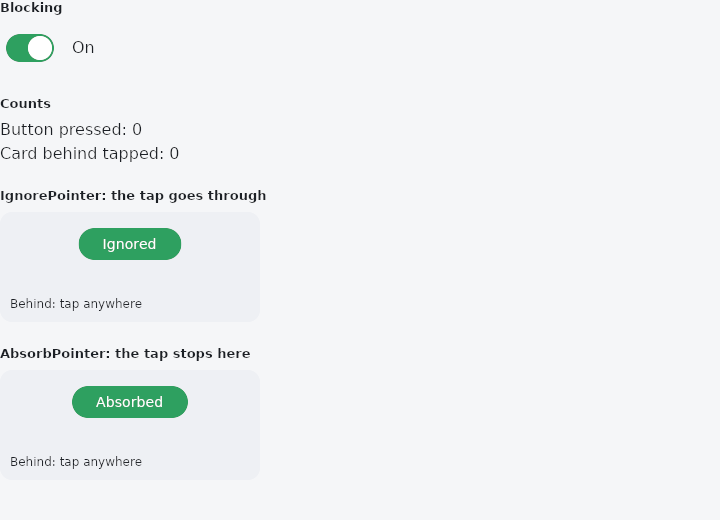
From frus-examples/widgets/src/features/interaction/widgets/pointer_barriers.rs:
//! `IgnorePointer` and `AbsorbPointer` — switch off the pointer for a subtree without
//! touching the widgets in it.
//!
//! Both leave the subtree drawn exactly as it is. The difference is what happens to a tap:
//! `IgnorePointer` lets it **through** to whatever is behind; `AbsorbPointer` **stops** it,
//! so nothing behind gets it either.

use frus::{
    component, AbsorbPointer, Align, Alignment, Button, Column, Container, IgnorePointer, Row,
    Stack, StackFit, Switch, Text, Widget,
};

use crate::common::shared::{section, sections};

pub fn example() -> Box<dyn Widget> {
    Box::new(component(|cx| {
        let blocked = cx.use_state(|| true);
        let front = cx.use_state(|| 0_u32);
        let behind = cx.use_state(|| 0_u32);
        let on = blocked.get();
        let scheme = &cx.theme().scheme;

        // A card behind, counting the taps that reach it, with a button in front of it.
        let scene = |front_button: Box<dyn Widget>| {
            let hit = behind.clone();
            Stack::new()
                .width(260.0)
                .height(110.0)
                .fit(StackFit::Expand)
                .layer(
                    Container::new()
                        .radius(12.0)
                        .color(scheme.surface_container_high)
                        .alignment(Alignment::BOTTOM_LEFT)
                        .padding(10.0)
                        .on_click(move || hit.update(|n| *n += 1))
                        .child(Text::new("Behind: tap anywhere").size(12.0)),
                )
                .layer(
                    Container::new()
                        .alignment(Alignment::TOP_CENTER)
                        .padding(12.0)
                        .child(front_button),
                )
        };
        let button = |label: &str| {
            let tap = front.clone();
            Button::new(label).on_press(move || tap.update(|n| *n += 1))
        };

        // While on, the button cannot be pressed — and a tap on it reaches the card behind.
        let ignoring = scene(Box::new(IgnorePointer::new(button("Ignored")).ignoring(on)));
        // While on, the button cannot be pressed — and the tap stops there.
        let absorbing = scene(Box::new(
            AbsorbPointer::new(button("Absorbed")).absorbing(on),
        ));

        let flip = blocked.clone();
        sections(vec![
            Box::new(section(
                "Blocking",
                Row::new()
                    .spacing(12.0)
                    .cross_axis_alignment(Align::Center)
                    .child(Switch::new(on).on_toggle(move |value| flip.set(value)))
                    .child(Text::new(if on { "On" } else { "Off" })),
            )),
            Box::new(section(
                "Counts",
                Column::new()
                    .spacing(4.0)
                    .cross_axis_alignment(Align::Start)
                    .child(Text::new(format!("Button pressed: {}", front.get())))
                    .child(Text::new(format!("Card behind tapped: {}", behind.get()))),
            )),
            Box::new(section("IgnorePointer: the tap goes through", ignoring)),
            Box::new(section("AbsorbPointer: the tap stops here", absorbing)),
        ])
    }))
}
Properties
| Type | Method | Argument | Effect |
|---|---|---|---|
IgnorePointer | .ignoring() | ignoring: bool | Turns the barrier on or off from a condition — false leaves the child fully interactive, so a caller does not have to build two different trees. |
AbsorbPointer | .absorbing() | absorbing: bool | Turns the barrier on or off from a condition. |
Behaviour
IgnorePointer
Makes its child invisible to input while leaving it laid out and painted.
Input passes straight through to whatever is behind — which is the whole difference from AbsorbPointer.
IgnorePointer::new(row).ignoring(saving) // inert while a save is in flight
The subtree keeps its accessibility nodes: a screen reader can still read a form that is momentarily inert, which is more useful than having it vanish. Wrap it in ExcludeSemantics as well if it really should be unreachable.
AbsorbPointer
Makes its child invisible to input and stops there: the barrier is itself an input target, so anything landing on it is swallowed rather than reaching what is painted behind.
This is the shield over a screen that is busy, and the backdrop of a modal.
AbsorbPointer::new(screen).absorbing(loading)
See also
- Shortcuts & Actions: keyboard shortcuts: a keystroke means an intent, an intent runs a handler.
- FocusableActionDetector & KeyboardListener: a custom control that answers the keyboard for itself.
- Visibility & Offstage: hide a child, keeping its box, its input, or nothing at all.
- Disabled state: one enabled flag on every control: greyed out, inert, value kept.
- Semantics: what a screen reader is told about a widget, said from outside it.
- The guide: Taking input
- API reference:
IgnorePointer - API reference:
AbsorbPointer
Source: crates/frus-widgets/src/barrier.rs, crates/frus-widgets/src/barrier.rs @ e6fba33f5b42