InteractiveViewer
Purpose
A viewport whose content can be panned and zoomed.
Signature
pub struct InteractiveViewer<Msg = crate::callback::Callback> { .. }

impl InteractiveViewer {
    pub fn new() -> Self;
}
Example
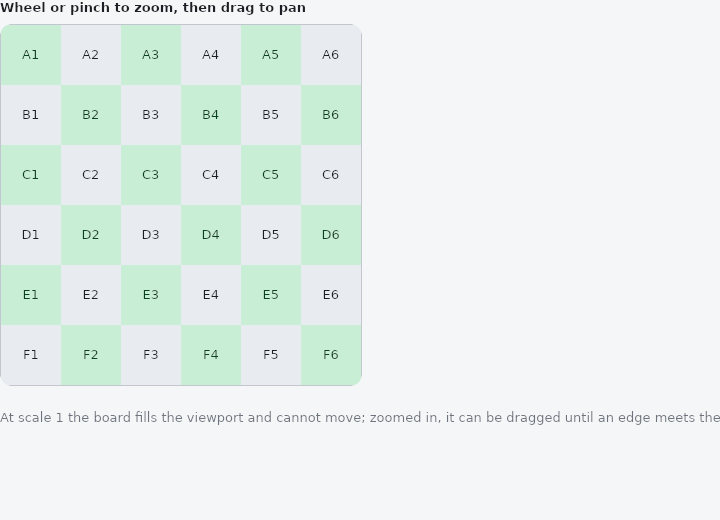
From frus-examples/widgets/src/features/interaction/widgets/interactive_viewer.rs:
//! `InteractiveViewer` — a viewport whose content can be panned (drag) and zoomed (mouse
//! wheel, trackpad or pinch): a map, a diagram, a photo.
//!
//! The pan and the zoom are kept by the framework between frames; you only say how big
//! the viewport is and how far the zoom may go.

use frus::{
    component, Alignment, Column, Container, InteractiveViewer, LayoutBuilder, Row, Text, Widget,
};

use crate::common::shared::{section, sections};

/// The content is a 6 × 6 board of tiles.
const CELLS: usize = 6;
/// The viewport is square, as wide as the page allows up to this.
const MAX_SIDE: f32 = 360.0;

pub fn example() -> Box<dyn Widget> {
    Box::new(component(|cx| {
        let scheme = cx.theme().scheme;
        let muted = scheme.on_surface_variant;

        // At scale 1 the content **fills the viewport exactly**: the viewer lays its
        // child out at the viewport's size. So the board is sized from the room the
        // `LayoutBuilder` reports, and zooming in is what reveals detail and makes room
        // to pan.
        let viewer = LayoutBuilder::new(move |size| {
            // Less the 1 px border drawn round it on each side.
            let side = (size.width - 2.0).min(MAX_SIDE);
            let cell = side / CELLS as f32;
            let board = (0..CELLS).fold(Column::new(), |column, row| {
                column.child((0..CELLS).fold(Row::new(), |line, col| {
                    // A checkerboard of two tones, each tile named by its coordinates.
                    let dark = (row + col) % 2 == 0;
                    line.child(
                        Container::new()
                            .width(cell)
                            .height(cell)
                            .color(if dark {
                                scheme.primary_container
                            } else {
                                scheme.surface_container_highest
                            })
                            .alignment(Alignment::CENTER)
                            .child(
                                Text::new(format!("{}{}", (b'A' + row as u8) as char, col + 1))
                                    .size(13.0)
                                    .color(if dark {
                                        scheme.on_primary_container
                                    } else {
                                        scheme.on_surface
                                    }),
                            ),
                    )
                }))
            });

            // Sized, or the frame would stretch to the whole width the builder was given.
            Container::new()
                .width(side + 2.0)
                .height(side + 2.0)
                .radius(12.0)
                .clip()
                .border(1.0, scheme.outline_variant)
                .child(
                    InteractiveViewer::new()
                        .width(side)
                        .height(side)
                        // From half size to four times the natural size.
                        .min_scale(0.5)
                        .max_scale(4.0)
                        .child(board),
                )
        });

        sections(vec![
            Box::new(section("Wheel or pinch to zoom, then drag to pan", viewer)),
            Box::new(
                Text::new(
                    "At scale 1 the board fills the viewport and cannot move; zoomed in, \
                     it can be dragged until an edge meets the viewport's.",
                )
                .wrap()
                .size(13.0)
                .color(muted),
            ),
        ])
    }))
}
Properties
| Method | Argument | Effect |
|---|---|---|
.width() | width: f32 | The viewport's fixed width, in logical pixels. |
.height() | height: f32 | The viewport's fixed height, in logical pixels. |
.flex() | grow: f32 | Flex growth factor along the parent's main axis. |
.min_scale() | min: f32 | The minimum scale allowed (zooming out). |
.max_scale() | max: f32 | The maximum scale allowed (zooming in). |
.child() | child: impl Widget<Msg> + 'static | Sets the pannable and zoomable child. |
Behaviour
A pannable and zoomable viewport: its child fills the viewport at scale 1, then the user pans it (by dragging) and zooms it (wheel or pinch) about the cursor. Any content that overflows is clipped to the viewport. Ideal for a map, a detailed image, a plan, a diagram.
Like crate::SingleChildScrollView, the viewport needs a bounded size (otherwise it collapses): a fixed width/height, or flex within a column or row. The scale is bounded by min_scale / max_scale.
See also
- Listener: the pointer's raw down, move, up and hover events.
- Draggable & DragTarget: pick a thing up and drop it on something else, with a payload.
- Focus & traversal: which widgets the keyboard reaches, in what order, and focusing from code.
- Shortcuts & Actions: keyboard shortcuts: a keystroke means an intent, an intent runs a handler.
- FocusableActionDetector & KeyboardListener: a custom control that answers the keyboard for itself.
- The guide: Taking input
- API reference:
InteractiveViewer
Source: crates/frus-widgets/src/interactive.rs @ e6fba33f5b42