MouseRegion
Purpose
The mouse entering, moving over and leaving a widget, and the cursor there.
Signature
pub struct MouseRegion<Msg = crate::callback::Callback> { .. }

impl MouseRegion {
    pub fn new(child: impl Widget<Msg> + 'static) -> Self;
}
Example
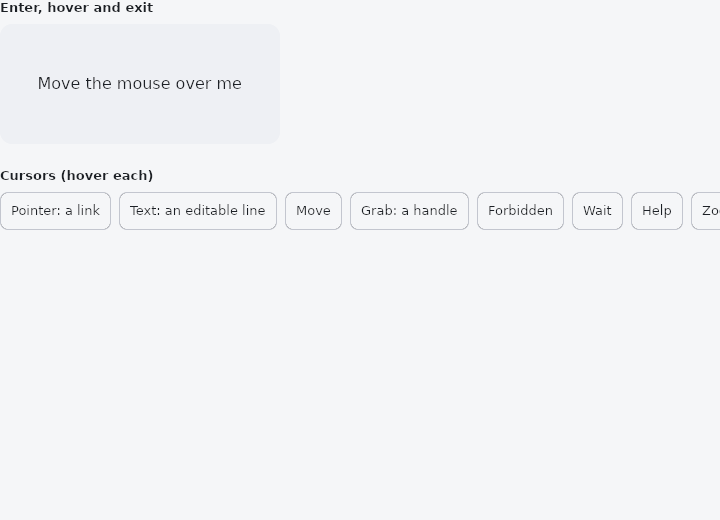
From frus-examples/widgets/src/features/interaction/widgets/mouse_region.rs:
//! `MouseRegion` — hears the mouse entering, moving over and leaving a widget, and sets
//! the cursor shown there.
//!
//! On a touch screen a finger is "over" a region only while it touches: an enter when it
//! goes down, an exit when it lifts, and no moves.

use frus::{
    Alignment, Container, Cursor, MouseRegion, Point, State, StateContext, StatefulWidget, Text,
    Widget, Wrap,
};

use crate::common::shared::{section, sections};

pub fn example() -> Box<dyn Widget> {
    Box::new(HoverDemo.into_widget())
}

struct HoverDemo;

struct HoverDemoState {
    inside: bool,
    position: Option<Point>,
}

impl StatefulWidget for HoverDemo {
    type State = HoverDemoState;

    fn create_state(&self) -> HoverDemoState {
        HoverDemoState {
            inside: false,
            position: None,
        }
    }
}

/// The cursors worth knowing, with the place each belongs.
const CURSORS: [(Cursor, &str); 8] = [
    (Cursor::Pointer, "Pointer: a link"),
    (Cursor::Text, "Text: an editable line"),
    (Cursor::Move, "Move"),
    (Cursor::Grab, "Grab: a handle"),
    (Cursor::Forbidden, "Forbidden"),
    (Cursor::Wait, "Wait"),
    (Cursor::Help, "Help"),
    (Cursor::ZoomIn, "Zoom in"),
];

impl State for HoverDemoState {
    type Widget = HoverDemo;

    fn build(&self, cx: &StateContext<Self>) -> Box<dyn Widget> {
        let scheme = &cx.theme().scheme;

        // Each callback receives the pointer's position in the region's own coordinates.
        let card = MouseRegion::new(
            Container::new()
                .width(280.0)
                .height(120.0)
                .radius(12.0)
                .color(if self.inside {
                    scheme.primary_container
                } else {
                    scheme.surface_container_high
                })
                .alignment(Alignment::CENTER)
                .child(Text::new(match self.position {
                    Some(p) if self.inside => format!("Pointer at ({:.0}, {:.0})", p.x, p.y),
                    _ => "Move the mouse over me".to_string(),
                })),
        )
        .on_enter(cx.handler(|s: &mut Self, at: Point| {
            s.inside = true;
            s.position = Some(at);
        }))
        .on_hover(cx.handler(|s: &mut Self, at: Point| s.position = Some(at)))
        .on_exit(cx.handler(|s: &mut Self, _at: Point| s.inside = false))
        .cursor(Cursor::Precise);

        let cursors =
            CURSORS
                .iter()
                .fold(Wrap::new().gap(8.0).run_gap(8.0), |row, (cursor, name)| {
                    row.child(
                        MouseRegion::new(
                            Container::new()
                                .padding(10.0)
                                .radius(8.0)
                                .border(1.0, scheme.outline_variant)
                                .child(Text::new(*name).size(13.0)),
                        )
                        .cursor(*cursor),
                    )
                });

        sections(vec![
            Box::new(section("Enter, hover and exit", card)),
            Box::new(section("Cursors (hover each)", cursors)),
        ])
    }
}
Properties
| Method | Argument | Effect |
|---|---|---|
.on_enter() | build: impl Fn(Point) -> R1 + 'static | The pointer came in: build is given where it is, in the region's coordinates. |
.on_hover() | build: impl Fn(Point) -> R1 + 'static | The pointer moved inside, with no button held: build is given where it is now. |
.on_exit() | build: impl Fn(Point) -> R1 + 'static | The pointer left: build is given where it is, now outside. |
.cursor() | cursor: Cursor | The cursor shown while the pointer is over the region, unless something inside it asks for another — a field's text cursor, a button's hand. |
.opaque() | opaque: bool | Whether the regions behind this one are left while the pointer is over it. On by default. |
Behaviour
Hears the pointer coming into its child, moving over it and leaving it, and sets the cursor shown while it is there.
A transparent wrapper: it is its child, laid out and painted exactly as the child would be without it.
use frus_widgets::{Cursor, MouseRegion, Text};

#[derive(Clone)]
enum Msg { Show, Hide }

let _card: MouseRegion<Msg> = MouseRegion::new(Text::new("Hover me"))
    .on_enter(|_| Msg::Show)
    .on_exit(|_| Msg::Hide)
    .cursor(Cursor::Pointer);
Every region under the pointer is in, the innermost first: a region inside another is entered with it. opaque(false) lets them be entered too.
A finger is over a region while it touches and not after: there is no hover without a mouse. So a finger sends an enter when it goes down and an exit when it lifts, and no moves.
See also
- GestureDetector: taps, double taps, long presses, right clicks and drags on any widget.
- InkWell: makes any content pressable, with an ink ripple, hover and focus feedback.
- Listener: the pointer's raw down, move, up and hover events.
- Draggable & DragTarget: pick a thing up and drop it on something else, with a payload.
- InteractiveViewer: a viewport whose content can be panned and zoomed.
- The guide: Taking input
- API reference:
MouseRegion
Source: crates/frus-widgets/src/mouseregion.rs @ e6fba33f5b42