Shortcuts and Actions
Purpose
Keyboard shortcuts: a keystroke means an intent, an intent runs a handler.
Signature
pub struct Shortcuts<Msg = crate::callback::Callback>(Wrapper<Msg>);

impl Shortcuts {
    pub fn new(child: impl Widget<Msg> + 'static) -> Self;
}
pub struct Actions<Msg = crate::callback::Callback>(Wrapper<Msg>);

impl Actions {
    pub fn new(child: impl Widget<Msg> + 'static) -> Self;
}
Example
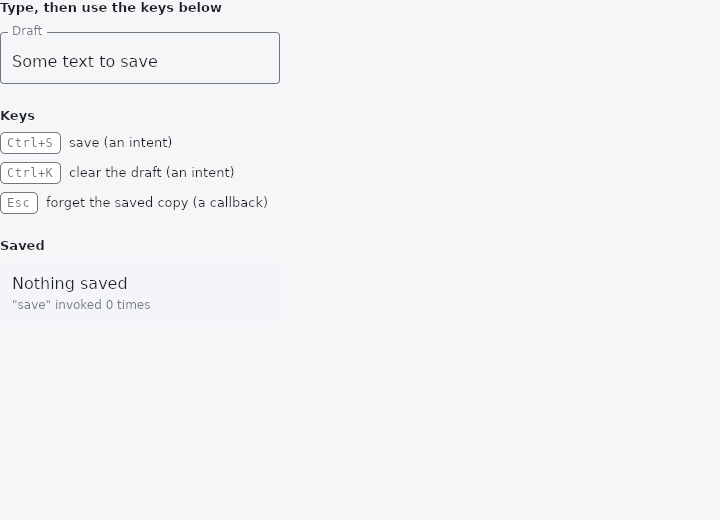
From frus-examples/widgets/src/features/interaction/widgets/shortcuts.rs:
//! `Shortcuts`, `Actions`, `ActionListener` and `CallbackShortcuts` — keyboard shortcuts.
//!
//! The work is split in two on purpose. `Shortcuts` maps a **keystroke to an intent**
//! (Ctrl+S means "save") and knows nothing of saving. `Actions` maps an **intent to a
//! handler** and knows nothing of keys. Either side can be replaced on its own: a subtree
//! can rebind the keys, or answer "save" differently — the innermost answer wins.

use frus::{
    component, ActionListener, Actions, Align, Callback, CallbackShortcuts, Column, Container,
    Intent, Kbd, KeyStroke, Row, ShortcutKey, Shortcuts, Text, TextField, Widget,
};

use crate::common::shared::{section, sections};

/// The intents this screen understands, named once.
const SAVE: Intent = Intent("save");
const CLEAR: Intent = Intent("clear");

pub fn example() -> Box<dyn Widget> {
    Box::new(component(|cx| {
        let draft = cx.use_state(|| "Some text to save".to_string());
        let saved = cx.use_state(|| None::<String>);
        let invoked = cx.use_state(|| 0_u32);
        let scheme = &cx.theme().scheme;

        let edit = draft.clone();
        let editor = TextField::new(draft.get())
            .label("Draft")
            .width(280.0)
            .on_input(move |text| edit.set(text));

        // Intent → handler.
        let (from, to) = (draft.clone(), saved.clone());
        let save = Callback::new(move || to.set(Some(from.get())));
        let wipe = draft.clone();
        let clear = Callback::new(move || wipe.set(String::new()));

        // Keystroke → intent, for while the focus is inside (or nothing is focused).
        // A bare letter would go to the text field first; a Ctrl combination does not.
        let bindings = Shortcuts::new(editor)
            .bind(KeyStroke::new(ShortcutKey::Char('s')).ctrl(), SAVE)
            .bind(KeyStroke::new(ShortcutKey::Char('k')).ctrl(), CLEAR);

        // `ActionListener` hears every "save" as well, without being the one that saves:
        // an undo stack, a status line, analytics.
        let count = invoked.clone();
        let heard = ActionListener::new(bindings)
            .on(SAVE, Callback::new(move || count.update(|n| *n += 1)));

        let scope = Actions::new(heard).action(SAVE, save).action(CLEAR, clear);

        // When there is no reason to name an intent, bind the key straight to a handler.
        let reset = saved.clone();
        let escape = CallbackShortcuts::new(scope).bind(
            KeyStroke::new(ShortcutKey::Escape),
            Callback::new(move || reset.set(None)),
        );

        let keys = |label: &str, stroke: &str| {
            Row::new()
                .spacing(8.0)
                .cross_axis_alignment(Align::Center)
                .child(Kbd::new(stroke))
                .child(Text::new(label).size(13.0))
        };

        sections(vec![
            Box::new(section("Type, then use the keys below", escape)),
            Box::new(section(
                "Keys",
                Column::new()
                    .spacing(8.0)
                    .cross_axis_alignment(Align::Start)
                    .child(keys("save (an intent)", "Ctrl+S"))
                    .child(keys("clear the draft (an intent)", "Ctrl+K"))
                    .child(keys("forget the saved copy (a callback)", "Esc")),
            )),
            Box::new(section(
                "Saved",
                Container::new()
                    .width(280.0)
                    .padding(12.0)
                    .radius(8.0)
                    .color(scheme.surface_container)
                    .child(
                        Column::new()
                            .spacing(4.0)
                            .cross_axis_alignment(Align::Start)
                            .child(Text::new(
                                saved.get().unwrap_or_else(|| "Nothing saved".to_string()),
                            ))
                            .child(
                                Text::new(format!("\"save\" invoked {} times", invoked.get()))
                                    .size(12.0)
                                    .color(scheme.on_surface_variant),
                            ),
                    ),
            )),
        ])
    }))
}
Properties
| Type | Method | Argument | Effect |
|---|---|---|---|
Shortcuts | .bind() | stroke: KeyStroke, intent: Intent | Binds a keystroke to an intent. A later binding for the same stroke replaces an earlier one, so a caller can override a table it did not write. |
Actions | .action() | intent: Intent, msg: Msg | What this scope does about intent. |
Behaviour
Shortcuts
Binds keystrokes to intents for its subtree. See the module's documentation for why that is two steps rather than one.
Actions
Answers intents for its subtree: the innermost Actions that has the intent is the one that answers it.
See also
- InteractiveViewer: a viewport whose content can be panned and zoomed.
- Focus & traversal: which widgets the keyboard reaches, in what order, and focusing from code.
- FocusableActionDetector & KeyboardListener: a custom control that answers the keyboard for itself.
- IgnorePointer & AbsorbPointer: switch off the pointer for a subtree: let taps through, or stop them.
- Visibility & Offstage: hide a child, keeping its box, its input, or nothing at all.
- The guide: Taking input
- API reference:
Shortcuts - API reference:
Actions
Source: crates/frus-widgets/src/shortcuts.rs, crates/frus-widgets/src/shortcuts.rs @ e6fba33f5b42