CustomMultiChildLayout
Purpose
Children measured and placed by a function you write.
Signature
pub struct CustomMultiChildLayout<Msg = crate::callback::Callback> { .. }

impl CustomMultiChildLayout {
    pub fn new(delegate: impl Fn(Size, &mut ChildLayout<'_>) + 'static) -> Self;
}
Example
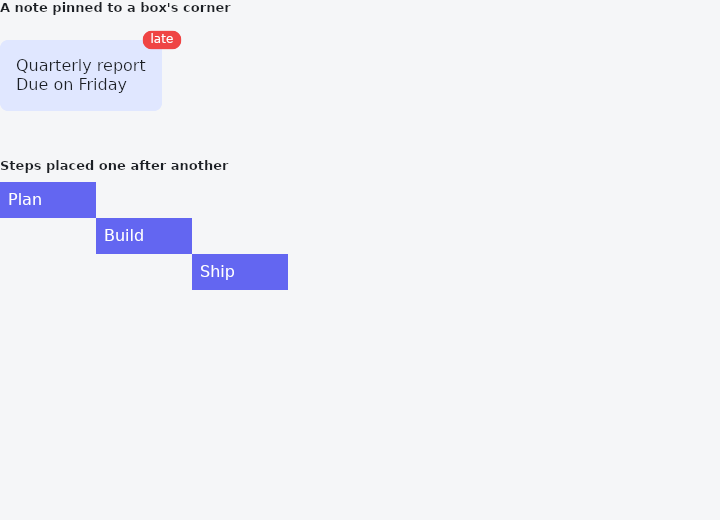
From frus-examples/widgets/src/features/layout/widgets/custom_multi_child_layout.rs:
//! `CustomMultiChildLayout` — children measured and placed by a function you write, for
//! arrangements no row, column or stack can express.
//!
//! Each child is named by a key. The function gets the layout's size, measures each
//! child under constraints it chooses (`layout_child`), and says where it goes
//! (`position_child`). A child can be measured before another is placed, so one can be
//! put against another's size.

use frus::{
    ChildAxis, ChildConstraints, Color, Container, CustomMultiChildLayout, Point, Size, Text,
    Widget,
};

use crate::common::shared::{section, sections};

pub fn example() -> Box<dyn Widget> {
    sections(vec![
        // A label that hangs off the corner of whatever it annotates: its place depends
        // on the box's measured size, which only a custom layout can know in advance.
        Box::new(section(
            "A note pinned to a box's corner",
            CustomMultiChildLayout::new(|size, layout| {
                let card = layout.layout_child(
                    "card",
                    ChildConstraints::loose(Size::new(size.width.min(220.0), size.height)),
                );
                layout.position_child("card", Point::new(0.0, 16.0));
                // The note is placed from the card's size: its top-right corner.
                let note = layout.layout_child("note", ChildConstraints::free());
                layout.position_child(
                    "note",
                    Point::new(card.width - note.width / 2.0, 16.0 - note.height / 2.0),
                );
            })
            // The layout's own size does not depend on its children: give it one.
            .width(280.0)
            .height(110.0)
            .child(
                "card",
                Container::new()
                    .padding(16.0)
                    .radius(8.0)
                    .color(Color::hex("#E0E7FF"))
                    .child(Text::new("Quarterly report\nDue on Friday").wrap()),
            )
            .child(
                "note",
                Container::new()
                    .padding_each(2.0, 8.0, 2.0, 8.0)
                    .radius(10.0)
                    .color(Color::hex("#EF4444"))
                    .child(Text::new("late").size(12.0).color(Color::hex("#FFFFFF"))),
            ),
        )),
        // A staircase: each step starts where the previous one ended, exactly 96 px
        // wide. `ChildAxis` sets each axis on its own.
        Box::new(section(
            "Steps placed one after another",
            ["Plan", "Build", "Ship"].iter().enumerate().fold(
                CustomMultiChildLayout::new(|_size, layout| {
                    let mut at = Point::new(0.0, 0.0);
                    for key in 0..3_usize {
                        let step = layout.layout_child(
                            key,
                            ChildConstraints::free().width(ChildAxis::Exactly(96.0)),
                        );
                        layout.position_child(key, at);
                        at = Point::new(at.x + step.width, at.y + step.height);
                    }
                })
                .width(300.0)
                .height(120.0),
                |layout, (key, label)| {
                    layout.child(
                        key,
                        Container::new()
                            .padding(8.0)
                            .color(Color::hex("#6366F1"))
                            .child(Text::new(*label).color(Color::hex("#FFFFFF"))),
                    )
                },
            ),
        )),
    ])
}
Properties
| Method | Argument | Effect |
|---|---|---|
.child() | key: impl Hash, child: impl Widget<Msg> + 'static | Adds child under key, which the function names it by. A key already given is given again: the first child under it is the one the function reaches. |
.width() | width: f32 | A width of its own, instead of the room. |
.height() | height: f32 | A height of its own, instead of the room. |
Behaviour
Places its children with a function the application writes: a circle of buttons, a fan of cards, a bubble whose tail points at its neighbour, nodes placed by a solver.
Each child is named by a key. The function is given the layout's size and, for each child, asks how big it is under constraints it chooses (ChildLayout::layout_child), then says where it goes (ChildLayout::position_child). A child can be measured before another is placed, so one can be put against another's size.
use frus_core::{Point, Size};
use frus_widgets::{ChildConstraints, CustomMultiChildLayout, Text};

// A caption under a title, indented by the title's height.
let _card = CustomMultiChildLayout::<()>::new(|size, layout| {
    let title = layout.layout_child("title", ChildConstraints::loose(size));
    layout.position_child("title", Point::new(0.0, 0.0));
    let room = Size::new(size.width - title.height, size.height - title.height);
    layout.layout_child("caption", ChildConstraints::loose(room));
    layout.position_child("caption", Point::new(title.height, title.height));
})
.child("title", Text::new("Seat map"))
.child("caption", Text::new("Row 12"));
Children are painted in the order they were given, and a child the function never lays out is not shown. Nothing is cut at the layout's edge.
See also
- SafeArea: keeps its child clear of status bars, notches, the gesture handle and the keyboard.
- LayoutBuilder & OrientationBuilder: builds from the room actually given, so a component adapts wherever it is placed.
- OverflowBar: a row of buttons that becomes a column when they stop fitting.
- TwoPane & responsive: a list and its detail side by side when wide, one at a time when narrow.
- Placeholder: a crossed box standing in for a widget not written yet.
- The guide: Laying out a screen
- API reference:
CustomMultiChildLayout
Source: crates/frus-widgets/src/customlayout.rs @ e6fba33f5b42