FractionallySizedBox
Purpose
A box sized as a fraction of the room its parent offers.
Signature
pub struct FractionallySizedBox<Msg = crate::callback::Callback> { .. }

impl FractionallySizedBox {
    pub fn new() -> Self;
}
Example
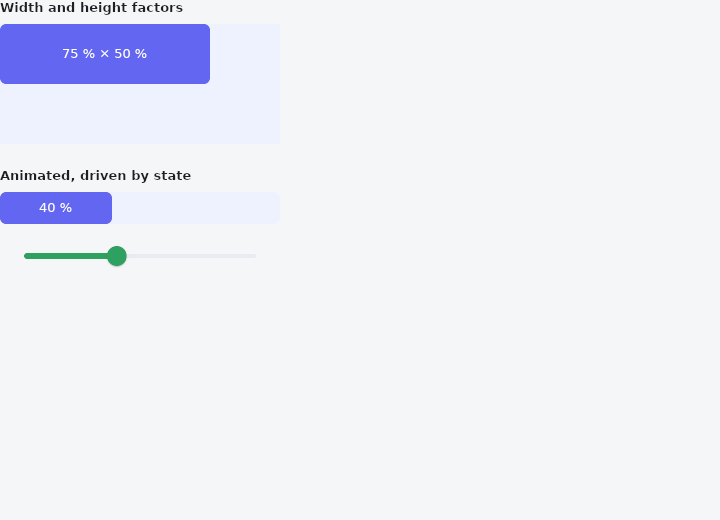
From frus-examples/widgets/src/features/layout/widgets/fractionally_sized_box.rs:
//! `FractionallySizedBox` — a box sized as a fraction of the room its parent offers.

use frus::{
    component, Alignment, Color, Column, Container, Curve, FractionallySizedBox, Slider, Text,
    Widget,
};

use crate::common::shared::{section, sections};

pub fn example() -> Box<dyn Widget> {
    sections(vec![
        // Fractions of a fixed frame: 75 % of the width, 50 % of the height.
        Box::new(section(
            "Width and height factors",
            Container::new()
                .width(280.0)
                .height(120.0)
                .color(Color::hex("#EEF2FF"))
                .child(
                    FractionallySizedBox::new()
                        .width_factor(0.75)
                        .height_factor(0.5)
                        .child(fill("75 % × 50 %")),
                ),
        )),
        // Live: drag the slider and the bar takes that share of the width. `animated`
        // makes it glide to each new size instead of jumping — a progress bar.
        Box::new(section("Animated, driven by state", live_bar())),
    ])
}

/// A component keeps the slider's value between frames (`use_state`); every change
/// rebuilds it with the new factor.
fn live_bar() -> impl Widget {
    component(|cx| {
        let share = cx.use_state(|| 0.4_f32);
        let current = share.get();
        Box::new(
            Column::new()
                .spacing(8.0)
                .child(
                    Container::new()
                        .width(280.0)
                        .height(32.0)
                        .radius(6.0)
                        .color(Color::hex("#EEF2FF"))
                        .child(
                            FractionallySizedBox::new()
                                .width_factor(current)
                                .animated(0.25, Curve::ease_out())
                                .child(fill(&format!("{:.0} %", current * 100.0))),
                        ),
                )
                .child(
                    Slider::new(current)
                        .width(280.0)
                        .on_change(move |value| share.set(value)),
                ),
        )
    })
}

fn fill(label: &str) -> Container {
    Container::new()
        .radius(6.0)
        .color(Color::hex("#6366F1"))
        .alignment(Alignment::CENTER)
        .child(Text::new(label).size(13.0).color(Color::hex("#FFFFFF")))
}
Properties
| Method | Argument | Effect |
|---|---|---|
.width_factor() | factor: f32 | Fraction 0.0..=1.0 of the parent's width (clamped to >= 0). |
.height_factor() | factor: f32 | Fraction 0.0..=1.0 of the parent's height (clamped to >= 0). |
.animated() | duration: f32, curve: Curve | Grows and shrinks to each new factor over duration seconds on curve, instead of arriving at it between one frame and the next. |
.child() | child: impl Widget<Msg> + 'static | Sets the child, which fills the fractional box. |
Behaviour
Takes a fraction of the parent's size on each axis that is set: width_factor(0.5) = half the parent's width, height_factor(0.25) = a quarter of its height. An axis left unset follows its content (its natural size). The child fills the box (stretch / flex).
Rather than constraining the child, the box sizes itself as a percentage of the parent (via Dimension::Percent). In the common case — a child that fills — that gives the same visual result, and it fits the flex model.
FractionallySizedBox::animated makes each change of factor a movement instead of a jump; crate::AnimatedFractionallySizedBox is the name for the same thing.
See also
- AspectRatio: a box whose height follows from its width.
- FittedBox: scales its child to fit its box, following a BoxFit rule.
- Wrap & ListBody: a row that flows onto new lines when it runs out of room.
- Stack & Positioned: children layered in the same box, pinned to its edges or aligned in it.
- IndexedStack: several children in one box, only one of them shown.
- The guide: Laying out a screen
- API reference:
FractionallySizedBox
Source: crates/frus-widgets/src/fractional.rs @ e6fba33f5b42