IndexedStack
Purpose
Several children in one box, only one of them shown.
Signature
pub struct IndexedStack<Msg = crate::callback::Callback> { .. }

impl IndexedStack {
    pub fn new(index: usize) -> Self;
}
Example
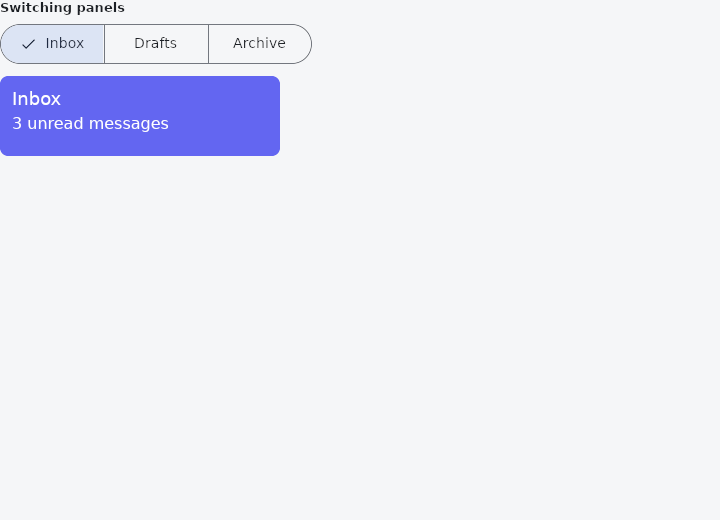
From frus-examples/widgets/src/features/layout/widgets/indexed_stack.rs:
//! `IndexedStack` — several children in one box, only one of them shown: the panels of
//! a tab set, the steps of a wizard.
//!
//! The box is as big as the biggest child, so switching panels does not make the page
//! jump.

use frus::{
    component, Align, Alignment, Color, Column, Container, IndexedStack, SegmentedButton, Text,
    Widget,
};

use crate::common::shared::{section, sections};

pub fn example() -> Box<dyn Widget> {
    sections(vec![Box::new(section("Switching panels", panels()))])
}

/// The selected index is state: a component keeps it between frames, and the segmented
/// button changes it.
fn panels() -> impl Widget {
    component(|cx| {
        let selected = cx.use_state(|| 0_usize);
        let index = selected.get();
        // A segmented button reports the segment that was tapped; the closure stores it.
        let on_select = move |segment: usize| selected.set(segment);
        Box::new(
            Column::new()
                .cross_axis_alignment(Align::Start)
                .spacing(12.0)
                .child(
                    SegmentedButton::new(index, on_select)
                        .segment("Inbox")
                        .segment("Drafts")
                        .segment("Archive"),
                )
                .child(
                    IndexedStack::new(index)
                        .child(panel("Inbox", "3 unread messages", "#6366F1", 80.0))
                        .child(panel("Drafts", "Nothing saved yet", "#F59E0B", 140.0))
                        .child(panel("Archive", "128 messages", "#10B981", 110.0)),
                ),
        )
    })
}

/// Panels of different heights: the stack keeps the tallest one's height for all of them.
fn panel(title: &str, body: &str, color: &str, height: f32) -> Container {
    Container::new()
        .width(280.0)
        .height(height)
        .padding(12.0)
        .radius(8.0)
        .color(Color::hex(color))
        .alignment(Alignment::TOP_LEFT)
        .child(
            Column::new()
                .cross_axis_alignment(Align::Start)
                .spacing(4.0)
                .child(Text::new(title).size(18.0).color(Color::hex("#FFFFFF")))
                .child(Text::new(body).color(Color::hex("#FFFFFF"))),
        )
}
Properties
| Method | Argument | Effect |
|---|---|---|
.index() | index: usize | Which child is shown. The others stay laid out. |
.child() | child: impl Widget<Msg> + 'static | Adds a child, after the previous ones. |
.fit() | fit: StackFit | How the children are sized. Unset, StackFit::Loose. |
.alignment() | alignment: impl Into<AlignmentGeometry> | Where a child smaller than the stack sits in it. |
.clip_behavior() | clip: Clip | What happens to a child that goes past the stack's edges. Unset, it is cut there. |
.text_direction() | direction: TextDirection | The reading direction the alignment is resolved in. Unset, the theme's. |
.width() | width: f32 | Sets the width, in logical pixels. |
.height() | height: f32 | Sets the height, in logical pixels. |
.flex() | grow: f32 | Flex growth factor along the parent's main axis. |
Behaviour
A stack that lays every child out and paints one of them.
The difference between this and crate::Offstage is the whole reason it exists. Offstage takes a branch out of the tree — no box, no paint, and nothing retained: right for a branch that is genuinely gone, wrong for the three pages of a tabbed screen. There, every switch measures a subtree that was laid out a moment ago, and the page that comes back comes back blank: its scroll offset, its caret and its focus were the runtime's record of a widget that stopped existing.
An IndexedStack keeps them all. Each child is laid out, in the same box, and one is painted; the others are silent — not drawn, not clickable, not read out — but still measured, and still holding whatever the runtime holds for them. So switching keeps their sizes, and keeps where they had been scrolled to.
IndexedStack::new(self.tab)
    .child(inbox_page())
    .child(sent_page())
    .child(drafts_page())
The price is exactly that: every page laid out on every frame, however many are shown. It is what a handful of tabs wants, and what a list of ten thousand rows does not — an index past the end simply paints nothing.
See also
- Wrap & ListBody: a row that flows onto new lines when it runs out of room.
- Stack & Positioned: children layered in the same box, pinned to its edges or aligned in it.
- Baseline: lines text up on the line its letters sit on.
- RotatedBox: turns its child by quarter turns, and the layout turns with it.
- SafeArea: keeps its child clear of status bars, notches, the gesture handle and the keyboard.
- The guide: Laying out a screen
- API reference:
IndexedStack
Source: crates/frus-widgets/src/stack.rs @ e6fba33f5b42