Padding
Purpose
Empty space around a child, on every side or each side on its own.
Signature
pub struct Padding<Msg = crate::callback::Callback> { .. }

impl Padding {
    pub fn new(padding: impl Into<InsetsGeometry>, child: impl Widget<Msg> + 'static) -> Self;
}
Example
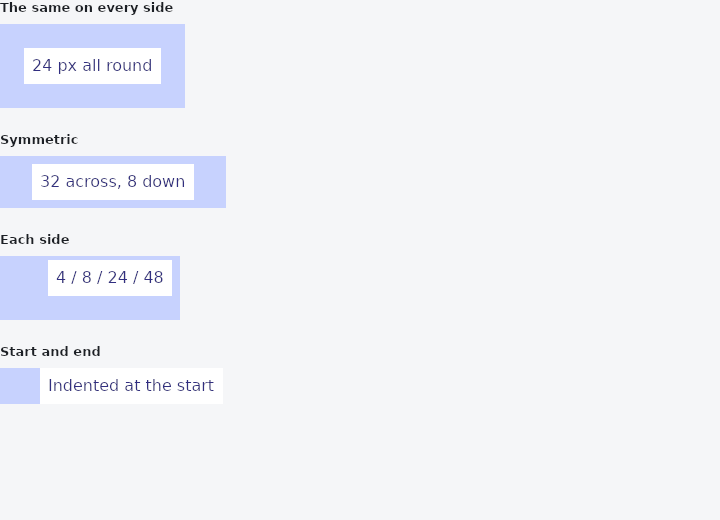
From frus-examples/widgets/src/features/layout/widgets/padding.rs:
//! `Padding` — empty space around a child, and nothing else.

use frus::{Color, Container, Insets, InsetsDirectional, Padding, Text, Widget};

use crate::common::shared::{section, sections};

pub fn example() -> Box<dyn Widget> {
    sections(vec![
        // A single number pads every side by the same amount.
        Box::new(section(
            "The same on every side",
            framed(Padding::new(24.0, label("24 px all round"))),
        )),
        // `Insets::symmetric(horizontal, vertical)`: wide and short, the shape of a button.
        Box::new(section(
            "Symmetric",
            framed(Padding::new(
                Insets::symmetric(32.0, 8.0),
                label("32 across, 8 down"),
            )),
        )),
        // `Insets::new(top, right, bottom, left)` sets each side on its own.
        Box::new(section(
            "Each side",
            framed(Padding::new(
                Insets::new(4.0, 8.0, 24.0, 48.0),
                label("4 / 8 / 24 / 48"),
            )),
        )),
        // Directional insets say "start" and "end" instead of left and right, so the
        // indent follows the reading direction: on the right in Arabic or Hebrew.
        Box::new(section(
            "Start and end",
            framed(Padding::new(
                InsetsDirectional::only_start(40.0),
                label("Indented at the start"),
            )),
        )),
    ])
}

/// The tinted box shows where the padding is: the label sits in a white box, the tint
/// around it is the padding.
fn framed(padding: Padding) -> Container {
    Container::new().color(Color::hex("#C7D2FE")).child(padding)
}

fn label(text: &str) -> Container {
    Container::new()
        .padding(8.0)
        .color(Color::hex("#FFFFFF"))
        .child(Text::new(text).color(Color::hex("#312E81")))
}
Properties
No builder methods: everything is set through the constructor.
Behaviour
Insets its child by padding on each side: the box is the child's size plus the padding, and the child is handed what is left of the room once the padding is taken out.
The padding is physical (Insets, whose left is the left in any script), directional (InsetsDirectional, whose start is the left in a left-to-right script and the right in a right-to-left one), or one number for all four sides.
use frus_core::{Insets, InsetsDirectional};
use frus_widgets::{Padding, Text};

let _all: Padding<()> = Padding::new(16.0, Text::new("Sixteen all round"));
let _sides: Padding<()> = Padding::new(Insets::symmetric(24.0, 8.0), Text::new("Wide"));
let _lead: Padding<()> = Padding::new(InsetsDirectional::only_start(72.0), Text::new("Indented"));
See also
- Container: one box that sizes, pads, colours, rounds, borders and shadows its child.
- Center & Aligned: places one child somewhere inside the room it is given.
- Row & Column: children in a line, across or down, with alignment on both axes and spacing.
- Flex: the flexbox line under Row and Column: shrink-wraps, stretches, wraps, reverses.
- The guide: Laying out a screen
- API reference:
Padding
Source: crates/frus-widgets/src/boxes.rs @ e6fba33f5b42