Row and Column
Purpose
Children in a line, across or down, with alignment on both axes and spacing.
Signature
pub struct Row<Msg = crate::callback::Callback> { .. }

impl Row {
    shared_api!(Row);;
}
pub struct Column<Msg = crate::callback::Callback> { .. }

impl Column {
    shared_api!(Column);;
}
Example
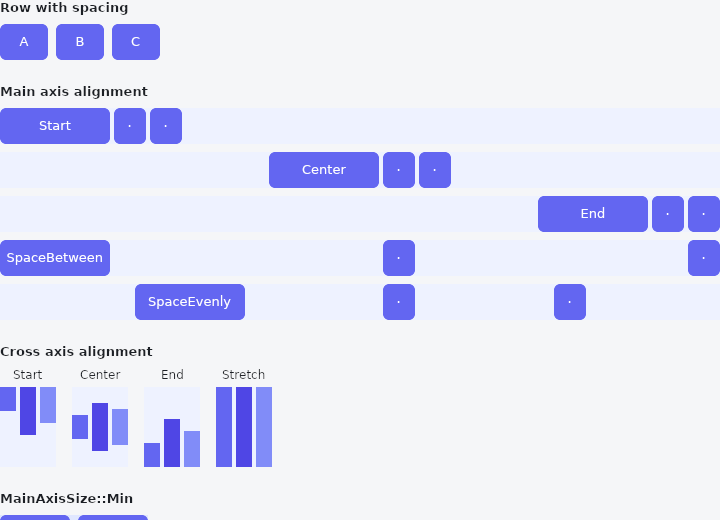
From frus-examples/widgets/src/features/layout/widgets/row_column.rs:
//! `Row` and `Column` — children in a line, across or down: the two containers most
//! screens are built from.

use frus::{
    Align, Alignment, Color, Column, Container, Justify, MainAxisSize, Row, Text, TextDirection,
    VerticalDirection, Widget,
};

use crate::common::shared::{section, sections};

pub fn example() -> Box<dyn Widget> {
    sections(vec![
        // `spacing` puts the same gap between every pair of children — no spacer widgets.
        Box::new(section(
            "Row with spacing",
            Row::new()
                .spacing(8.0)
                .child(block("A", 48.0))
                .child(block("B", 48.0))
                .child(block("C", 48.0)),
        )),
        // A row fills the width it is given, so the main-axis alignment decides where the
        // free room goes: at the end, in the middle, or shared between the children.
        Box::new(section(
            "Main axis alignment",
            Column::new()
                .spacing(8.0)
                .child(lane(Justify::Start, "Start"))
                .child(lane(Justify::Center, "Center"))
                .child(lane(Justify::End, "End"))
                .child(lane(Justify::SpaceBetween, "SpaceBetween"))
                .child(lane(Justify::SpaceEvenly, "SpaceEvenly")),
        )),
        // The cross axis is the other direction. Children of different heights line up on
        // their tops, their centres (the default) or their bottoms, or all stretch to the
        // tallest one.
        Box::new(section(
            "Cross axis alignment",
            Row::new()
                .spacing(16.0)
                .child(tall_row(Align::Start, "Start"))
                .child(tall_row(Align::Center, "Center"))
                .child(tall_row(Align::End, "End"))
                .child(tall_row(Align::Stretch, "Stretch")),
        )),
        // `MainAxisSize::Min` makes the row only as wide as its children — the size you
        // want for a row that is itself placed by something else, such as a button's
        // icon and label.
        Box::new(section(
            "MainAxisSize::Min",
            Container::new().color(Color::hex("#E0E7FF")).child(
                Row::new()
                    .main_axis_size(MainAxisSize::Min)
                    .spacing(8.0)
                    .child(block("Shrink", 70.0))
                    .child(block("wrapped", 70.0)),
            ),
        )),
        // A column is the same thing downwards. `vertical_direction(Up)` stacks from the
        // bottom; a row's `text_direction(Rtl)` lays its children out right to left.
        Box::new(section(
            "Column, and both directions reversed",
            Row::new()
                .spacing(24.0)
                .cross_axis_alignment(Align::Start)
                .child(
                    Column::new()
                        .spacing(4.0)
                        .child(block("1", 48.0))
                        .child(block("2", 48.0))
                        .child(block("3", 48.0)),
                )
                .child(
                    Column::new()
                        .spacing(4.0)
                        .vertical_direction(VerticalDirection::Up)
                        .child(block("1", 48.0))
                        .child(block("2", 48.0))
                        .child(block("3", 48.0)),
                )
                .child(
                    Row::new()
                        .main_axis_size(MainAxisSize::Min)
                        .spacing(4.0)
                        .text_direction(TextDirection::Rtl)
                        .child(block("1", 40.0))
                        .child(block("2", 40.0))
                        .child(block("3", 40.0)),
                ),
        )),
    ])
}

/// A full-width row of three blocks, aligned along its length by `justify`.
fn lane(justify: Justify, name: &str) -> Container {
    Container::new().color(Color::hex("#EEF2FF")).child(
        Row::new()
            .main_axis_alignment(justify)
            .spacing(4.0)
            .child(block(name, 110.0))
            .child(block("·", 32.0))
            .child(block("·", 32.0)),
    )
}

/// Three children of different heights, aligned across the row by `align`.
fn tall_row(align: Align, name: &str) -> Column {
    // Stretch only stretches a child that has no height of its own.
    let bar = |height: f32, color: &str| {
        let bar = Container::new().width(16.0).color(Color::hex(color));
        if align == Align::Stretch {
            bar
        } else {
            bar.height(height)
        }
    };
    Column::new()
        .spacing(4.0)
        .child(Text::new(name).size(12.0))
        .child(
            Container::new()
                .height(80.0)
                .color(Color::hex("#EEF2FF"))
                .child(
                    Row::new()
                        .main_axis_size(MainAxisSize::Min)
                        .cross_axis_alignment(align)
                        .spacing(4.0)
                        .child(bar(24.0, "#6366F1"))
                        .child(bar(48.0, "#4F46E5"))
                        .child(bar(36.0, "#818CF8")),
                ),
        )
}

fn block(label: &str, width: f32) -> Container {
    Container::new()
        .width(width)
        .height(36.0)
        .radius(6.0)
        .color(Color::hex("#6366F1"))
        .alignment(Alignment::CENTER)
        .child(Text::new(label).size(13.0).color(Color::hex("#FFFFFF")))
}
Properties
| Type | Method | Argument | Effect |
|---|---|---|---|
Row | .main_axis_alignment() | Row | How the children are distributed along the main axis. |
Row | .cross_axis_alignment() | Row | How the children are aligned across the main axis. |
Row | .main_axis_size() | Row | Whether the run fills its main axis or shrink-wraps its children. |
Row | .shrink_wrap() | Row | Shrink-wraps the main axis: MainAxisSize::Min, named. |
Row | .spacing() | Row | Space between adjacent children, in logical pixels. It is not added before the first or after the last. |
Row | .text_direction() | Row | The reading direction this run should use, overriding the ambient one. |
Row | .vertical_direction() | Row | Which way the vertical axis runs: a Column's order, a Row's idea of which edge Align::Start means. |
Row | .child() | Row | Adds a child. |
Row | .child_boxed() | Row | Adds an already boxed child, for children built in a loop. |
Row | .children() | Row | Adds every child of an iterator. |
Column | .main_axis_alignment() | Column | How the children are distributed along the main axis. |
Column | .cross_axis_alignment() | Column | How the children are aligned across the main axis. |
Column | .main_axis_size() | Column | Whether the run fills its main axis or shrink-wraps its children. |
Column | .shrink_wrap() | Column | Shrink-wraps the main axis: MainAxisSize::Min, named. |
Column | .spacing() | Column | Space between adjacent children, in logical pixels. It is not added before the first or after the last. |
Column | .text_direction() | Column | The reading direction this run should use, overriding the ambient one. |
Column | .vertical_direction() | Column | Which way the vertical axis runs: a Column's order, a Row's idea of which edge Align::Start means. |
Column | .child() | Column | Adds a child. |
Column | .child_boxed() | Column | Adds an already boxed child, for children built in a loop. |
Column | .children() | Column | Adds every child of an iterator. |
Behaviour
Row
A horizontal run of children.
Row::new()
    .main_axis_alignment(Justify::SpaceBetween)
    .cross_axis_alignment(Align::Center)
    .spacing(8.0)
    .child(Text::new("Total"))
    .child(Text::new("42.00"))
To give one child the space the others do not need, wrap it in crate::Expanded; to let it take that space without being forced to fill it, Expanded::loose. To put the children on one text baseline rather than on their centres, ask for Align::Baseline.
Column
A vertical run of children.
Column::new()
    .cross_axis_alignment(Align::Start)
    .main_axis_size(MainAxisSize::Min)
    .spacing(4.0)
    .child(Text::new("Title"))
    .child(Text::new("Subtitle"))
Everything Row says applies, with the axes swapped: the column fills the height it is offered, centres its children horizontally, and runs top to bottom.
A column does not scroll. More children than fit is an overflow, reported as one; if the content can outgrow the screen, that is what crate::ListView is for.
See also
- Padding: empty space around a child, on every side or each side on its own.
- Center & Aligned: places one child somewhere inside the room it is given.
- Flex: the flexbox line under Row and Column: shrink-wraps, stretches, wraps, reverses.
- Expanded, Flexible & Spacer: share the free room of a row or a column between some of its children.
- SizedBox: a box of a given size: to size its child, or, empty, as a fixed gap.
- The guide: Laying out a screen
- API reference:
Row - API reference:
Column
Source: crates/frus-widgets/src/rowcolumn.rs, crates/frus-widgets/src/rowcolumn.rs @ e6fba33f5b42