SizedBox
Purpose
A box of a given size: to size its child, or, empty, as a fixed gap.
Signature
pub struct SizedBox<Msg = crate::callback::Callback> { .. }

impl SizedBox {
    pub fn empty() -> Self;
    pub fn new(child: impl Widget<Msg> + 'static) -> Self;
    pub fn square(side: f32, child: impl Widget<Msg> + 'static) -> Self;
    pub fn expand(child: impl Widget<Msg> + 'static) -> Self;
    pub fn shrink(child: impl Widget<Msg> + 'static) -> Self;
}
Example
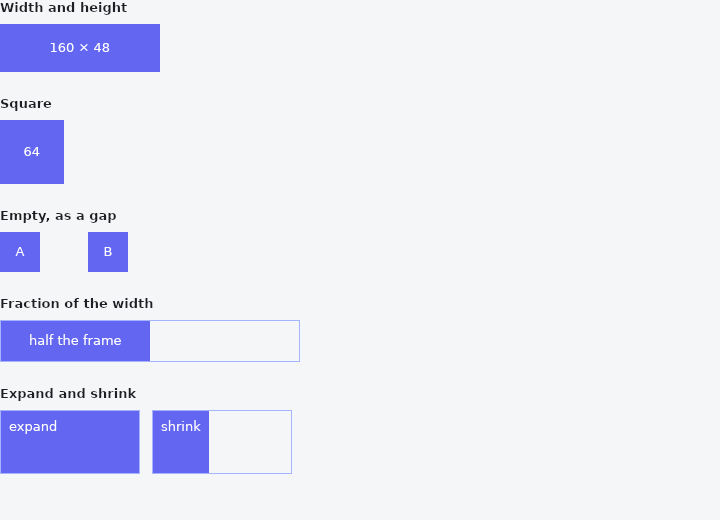
From frus-examples/widgets/src/features/layout/widgets/sized_box.rs:
//! `SizedBox` — a box of a given size: to size its child, or, empty, as a fixed gap.

use frus::{Alignment, Color, Container, Row, SizedBox, Text, Widget};

use crate::common::shared::{section, sections};

pub fn example() -> Box<dyn Widget> {
    sections(vec![
        // A fixed width and height forces the child to that size.
        Box::new(section(
            "Width and height",
            SizedBox::new(filler("160 × 48")).width(160.0).height(48.0),
        )),
        // `square` is the same on both axes — an avatar, an icon slot.
        Box::new(section("Square", SizedBox::square(64.0, filler("64")))),
        // An empty one is a fixed gap: between two children of a row that has no
        // `spacing`, for instance.
        Box::new(section(
            "Empty, as a gap",
            Row::new()
                .child(SizedBox::square(40.0, filler("A")))
                .child(SizedBox::empty().width(48.0))
                .child(SizedBox::square(40.0, filler("B"))),
        )),
        // A fraction of the room its parent has: half of a 300 px frame.
        Box::new(section(
            "Fraction of the width",
            Container::new()
                .width(300.0)
                .border(1.0, Color::hex("#A5B4FC"))
                .child(
                    SizedBox::new(filler("half the frame"))
                        .width_fraction(0.5)
                        .height(40.0),
                ),
        )),
        // `expand` takes all the room it is offered; `shrink` takes only what its child
        // needs, inside a parent that would otherwise stretch it.
        Box::new(section(
            "Expand and shrink",
            Row::new()
                .spacing(12.0)
                .child(frame(SizedBox::expand(tag("expand"))))
                .child(frame(SizedBox::shrink(tag("shrink")))),
        )),
    ])
}

fn frame(child: impl Widget + 'static) -> Container {
    Container::new()
        .width(140.0)
        .height(64.0)
        .border(1.0, Color::hex("#A5B4FC"))
        .child(child)
}

fn filler(label: &str) -> Container {
    Container::new()
        .color(Color::hex("#6366F1"))
        .alignment(Alignment::CENTER)
        .child(Text::new(label).size(13.0).color(Color::hex("#FFFFFF")))
}

/// A label with no size of its own: it is as big as whatever sizes it.
fn tag(label: &str) -> Container {
    Container::new()
        .padding(8.0)
        .color(Color::hex("#6366F1"))
        .child(Text::new(label).size(13.0).color(Color::hex("#FFFFFF")))
}
Properties
| Method | Argument | Effect |
|---|---|---|
.width() | width: f32 | Sets the width, in logical pixels. |
.height() | height: f32 | Sets the height, in logical pixels. |
.width_fraction() | fraction: f32 | Sets the width as a fraction of the parent's (1.0 = all of it). |
.height_fraction() | fraction: f32 | Sets the height as a fraction of the parent's. |
.child() | child: impl Widget<Msg> + 'static | Sets the child, replacing any already there. |
Behaviour
A box of a given size — or one that fills what it is given, or one that takes only what its child needs.
SizedBox::empty() with a size is also the plainest way to put a gap somewhere that has no gap of its own; with no child it draws nothing at all.
See also
- Flex: the flexbox line under Row and Column: shrink-wraps, stretches, wraps, reverses.
- Expanded, Flexible & Spacer: share the free room of a row or a column between some of its children.
- ConstrainedBox, LimitedBox & Intrinsic: floors and ceilings on a child's size, or the size its content would like.
- UnconstrainedBox & OverflowBox: let a child be a size its parent did not offer.
- AspectRatio: a box whose height follows from its width.
- The guide: Laying out a screen
- API reference:
SizedBox
Source: crates/frus-widgets/src/constraints.rs @ e6fba33f5b42