Stack and Positioned
Purpose
Children layered in the same box, pinned to its edges or aligned in it.
Signature
pub struct Stack<Msg = crate::callback::Callback> { .. }

impl Stack {
    pub fn new() -> Self;
}
pub struct Positioned<Msg = crate::callback::Callback> { .. }

impl Positioned {
    pub fn new(inner: impl Widget<Msg> + 'static) -> Self;
    pub fn fill(inner: impl Widget<Msg> + 'static) -> Self;
    pub fn from_rect(inner: impl Widget<Msg> + 'static, rect: frus_core::Rect) -> Self;
    pub fn from_relative_rect(inner: impl Widget<Msg> + 'static, edges: frus_core::Insets) -> Self;
}
Example
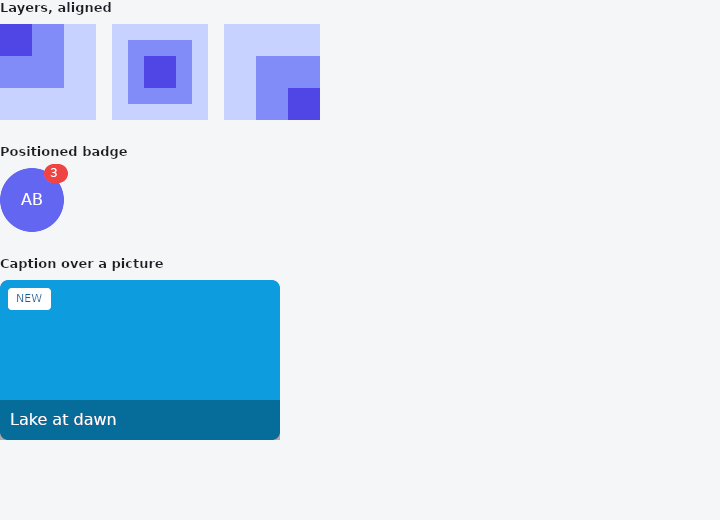
From frus-examples/widgets/src/features/layout/widgets/stack.rs:
//! `Stack` and `Positioned` — children layered in the same box, the last on top: a
//! badge on an avatar, a caption over a picture, a button floating over content.

use frus::{Alignment, Clip, Color, Container, Positioned, Stack, StackFit, Text, Widget, Wrap};

use crate::common::shared::{section, sections};

pub fn example() -> Box<dyn Widget> {
    sections(vec![
        // Layers that are not positioned sit at the stack's `alignment`; the stack is as
        // big as the biggest of them.
        Box::new(section(
            "Layers, aligned",
            Wrap::new()
                .gap(16.0)
                .run_gap(16.0)
                .child(squares(Alignment::TOP_LEFT))
                .child(squares(Alignment::CENTER))
                .child(squares(Alignment::BOTTOM_RIGHT)),
        )),
        // `Positioned` pins a layer against the stack's edges: a badge in the top-right
        // corner of an avatar. A layer that goes past the edge is clipped unless the
        // stack's `clip_behavior` says `Clip::None`.
        Box::new(section(
            "Positioned badge",
            Stack::new()
                .clip_behavior(Clip::None)
                .layer(
                    Container::new()
                        .width(64.0)
                        .height(64.0)
                        .radius(32.0)
                        .color(Color::hex("#6366F1"))
                        .alignment(Alignment::CENTER)
                        .child(Text::new("AB").color(Color::hex("#FFFFFF"))),
                )
                .layer(
                    Positioned::new(
                        Container::new()
                            .padding_each(2.0, 6.0, 2.0, 6.0)
                            .radius(10.0)
                            .color(Color::hex("#EF4444"))
                            .child(Text::new("3").size(12.0).color(Color::hex("#FFFFFF"))),
                    )
                    .top(-4.0)
                    .right(-4.0),
                ),
        )),
        // Pinning two opposite edges sizes the layer: `left` + `right` makes a caption bar
        // as wide as the picture, `bottom` puts it at the foot. `Positioned::fill` covers
        // the whole stack — a tint over a picture.
        Box::new(section(
            "Caption over a picture",
            Stack::new()
                .width(280.0)
                .height(160.0)
                .fit(StackFit::Expand)
                .layer(Container::new().radius(8.0).color(Color::hex("#0EA5E9")))
                .layer(Positioned::fill(
                    Container::new()
                        .radius(8.0)
                        .color(Color::rgba(0.0, 0.0, 0.0, 0.1)),
                ))
                .layer(
                    Positioned::new(
                        Container::new()
                            .padding(10.0)
                            .color(Color::rgba(0.0, 0.0, 0.0, 0.55))
                            .child(Text::new("Lake at dawn").color(Color::hex("#FFFFFF"))),
                    )
                    .left(0.0)
                    .right(0.0)
                    .bottom(0.0),
                )
                .layer(
                    Positioned::new(
                        Container::new()
                            .padding_each(4.0, 8.0, 4.0, 8.0)
                            .radius(4.0)
                            .color(Color::hex("#FFFFFF"))
                            .child(Text::new("NEW").size(11.0).color(Color::hex("#0369A1"))),
                    )
                    .top(8.0)
                    .start(8.0),
                ),
        )),
    ])
}

/// Three squares of decreasing size, layered and aligned the same way.
fn squares(alignment: Alignment) -> Stack {
    Stack::new()
        .alignment(alignment)
        .layer(
            Container::new()
                .width(96.0)
                .height(96.0)
                .color(Color::hex("#C7D2FE")),
        )
        .layer(
            Container::new()
                .width(64.0)
                .height(64.0)
                .color(Color::hex("#818CF8")),
        )
        .layer(
            Container::new()
                .width(32.0)
                .height(32.0)
                .color(Color::hex("#4F46E5")),
        )
}
Properties
| Type | Method | Argument | Effect |
|---|---|---|---|
Stack | .fit() | fit: StackFit | How the layers that are not crate::Positioned are sized. Unset, StackFit::Loose. |
Stack | .alignment() | alignment: impl Into<AlignmentGeometry> | Where a layer smaller than the stack sits in it: the layers that are not crate::Positioned, and the axes of one that pinned neither edge. Unset, the top start corner. |
Stack | .clip_behavior() | clip: Clip | What happens to a layer that goes past the stack's edges. Unset, Clip::HardEdge: it is cut there. Clip::None lets it hang over. |
Stack | .text_direction() | direction: TextDirection | The reading direction the alignment and the start and end pins are resolved in. Unset, the theme's. |
Stack | .width() | width: f32 | Sets the width, in logical pixels. |
Stack | .height() | height: f32 | Sets the height, in logical pixels. |
Stack | .flex() | grow: f32 | Flex growth factor along the parent's main axis. |
Stack | .layer() | layer: impl Widget<Msg> + 'static | Adds a layer, on top of the previous ones. |
Positioned | .left() | px: f32 | Distance from the stack's left edge — the left in either reading direction; see start for one that follows the script. |
Positioned | .top() | px: f32 | Distance from the stack's top edge. |
Positioned | .right() | px: f32 | Distance from the stack's right edge. |
Positioned | .bottom() | px: f32 | Distance from the stack's bottom edge. |
Positioned | .start() | px: f32 | Distance from the stack's start edge: the left in a left-to-right script, the right in a right-to-left one (milestone 589). A left or a right set as well wins on its own side. |
Positioned | .end() | px: f32 | Distance from the stack's end edge: the right in a left-to-right script, the left in a right-to-left one. |
Positioned | .width() | px: f32 | An explicit width, used when only one horizontal edge is pinned. |
Positioned | .height() | px: f32 | An explicit height, used when only one vertical edge is pinned. |
Positioned | .inset() | px: f32 | Pins all four edges: the layer fills the stack inset by px on every side. |
Behaviour
Stack
A container of overlaid layers.
Positioned
A layer pinned against a crate::Stack's edges. See the module documentation.
See also
- FractionallySizedBox: a box sized as a fraction of the room its parent offers.
- Wrap & ListBody: a row that flows onto new lines when it runs out of room.
- IndexedStack: several children in one box, only one of them shown.
- Baseline: lines text up on the line its letters sit on.
- RotatedBox: turns its child by quarter turns, and the layout turns with it.
- The guide: Laying out a screen
- API reference:
Stack - API reference:
Positioned
Source: crates/frus-widgets/src/stack.rs, crates/frus-widgets/src/positioned.rs @ e6fba33f5b42