Wrap and ListBody
Purpose
A row that flows onto new lines when it runs out of room.
Signature
pub struct Wrap;
pub struct ListBody;
Example
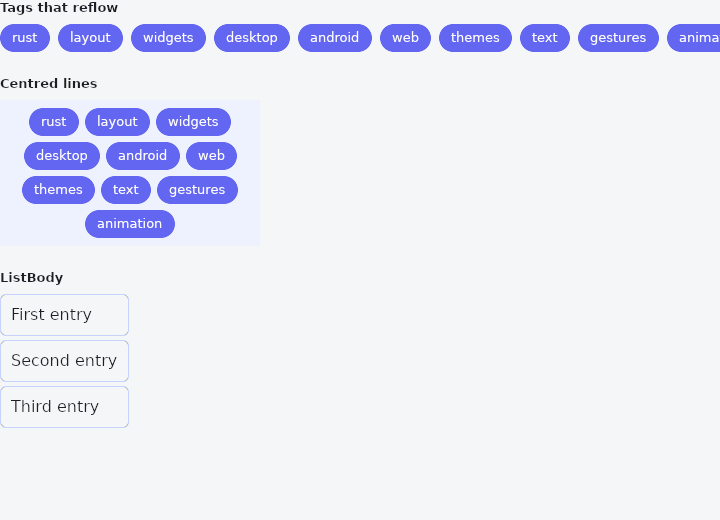
From frus-examples/widgets/src/features/layout/widgets/wrap.rs:
//! `Wrap` and `ListBody` — a row that flows onto new lines when it runs out of room,
//! and a plain list of children one after the other.

use frus::{AlignContent, Color, Container, Justify, ListBody, Text, Widget, Wrap};

use crate::common::shared::{section, sections};

const TAGS: [&str; 10] = [
    "rust",
    "layout",
    "widgets",
    "desktop",
    "android",
    "web",
    "themes",
    "text",
    "gestures",
    "animation",
];

pub fn example() -> Box<dyn Widget> {
    sections(vec![
        // Tags, filters, chips: as many per line as fit, the rest on the next line.
        // `gap` spaces them along a line, `run_gap` spaces the lines. Narrow the window
        // and watch them reflow.
        Box::new(section(
            "Tags that reflow",
            TAGS.iter()
                .fold(Wrap::new().gap(8.0).run_gap(8.0), |wrap, tag| {
                    wrap.child(chip(tag))
                }),
        )),
        // In a fixed width, `justify` places each line's items and `align_lines` places
        // the lines in the box.
        Box::new(section(
            "Centred lines",
            Container::new().color(Color::hex("#EEF2FF")).child(
                TAGS.iter().fold(
                    Wrap::new()
                        .width(260.0)
                        .padding(8.0)
                        .gap(6.0)
                        .run_gap(6.0)
                        .justify(Justify::Center)
                        .align_lines(AlignContent::Center),
                    |wrap, tag| wrap.child(chip(tag)),
                ),
            ),
        )),
        // `ListBody` lays its children out one after the other along an axis, each at
        // its own size — the body of a list without the scrolling.
        Box::new(section(
            "ListBody",
            ListBody::vertical()
                .gap(4.0)
                .child(row("First entry"))
                .child(row("Second entry"))
                .child(row("Third entry")),
        )),
    ])
}

fn chip(label: &str) -> Container {
    Container::new()
        .padding_each(6.0, 12.0, 6.0, 12.0)
        .radius(16.0)
        .color(Color::hex("#6366F1"))
        .child(Text::new(label).size(13.0).color(Color::hex("#FFFFFF")))
}

fn row(label: &str) -> Container {
    Container::new()
        .padding(10.0)
        .radius(6.0)
        .border(1.0, Color::hex("#C7D2FE"))
        .child(Text::new(label))
}
Properties
No builder methods: everything is set through the constructor.
Behaviour
Wrap
A named entry point for a wrapping row (flex-wrap).
Wrap::new().gap(8.0).child(a).child(b)… — the children flow over several lines according to the available width, with no breakpoint. It returns a Flex, a row with wrap turned on, so all its settings remain available.
ListBody
Children one after another along an axis, each at its natural extent on that axis and stretched across the other, starting at the beginning and never squashed. Its box grows to hold them all, which is why it belongs inside something that scrolls — a body taller than its parent with nowhere to go is an overflow, and says so.
It returns a Flex, because in this framework that is already what a list body is: the flex defaults here are flex_shrink: 0, align: Stretch and justify: Start — a column that squashes nothing, stretches everything across, and packs from the top. What the name adds is the statement: this column is the content of a viewport, not a layout with opinions, and nothing in it is meant to flex. Every one of Flex's settings is still there, gap and padding included.
Scroll::new().child(
    ListBody::vertical()
        .gap(8.0)
        .child(header())
        .child(body()),
)
Its reverse is Flex::reverse, which lays the children out from the far end — the shape a chat transcript wants, together with a scroll region that starts at the bottom.
See also
- FittedBox: scales its child to fit its box, following a BoxFit rule.
- FractionallySizedBox: a box sized as a fraction of the room its parent offers.
- Stack & Positioned: children layered in the same box, pinned to its edges or aligned in it.
- IndexedStack: several children in one box, only one of them shown.
- Baseline: lines text up on the line its letters sit on.
- The guide: Laying out a screen
- API reference:
Wrap - API reference:
ListBody
Source: crates/frus-widgets/src/flex.rs, crates/frus-widgets/src/flex.rs @ e6fba33f5b42