ClipRect and ClipRRect and ClipOval and ClipPath
Purpose
Cuts a child's painting to a rectangle, rounded corners, an oval or any path.
Signature
pub struct ClipRect<Msg = crate::callback::Callback> { .. }

impl ClipRect {
    pub fn new() -> Self;
}
pub struct ClipRRect<Msg = crate::callback::Callback> { .. }

impl ClipRRect {
    pub fn new(radius: f32) -> Self;
    pub fn rounded(radius: BorderRadius) -> Self;
}
pub struct ClipOval<Msg = crate::callback::Callback> { .. }

impl ClipOval {
    pub fn new() -> Self;
}
pub struct ClipPath<Msg = crate::callback::Callback> { .. }

impl ClipPath {
    pub fn new(path: Path) -> Self;
}
Example
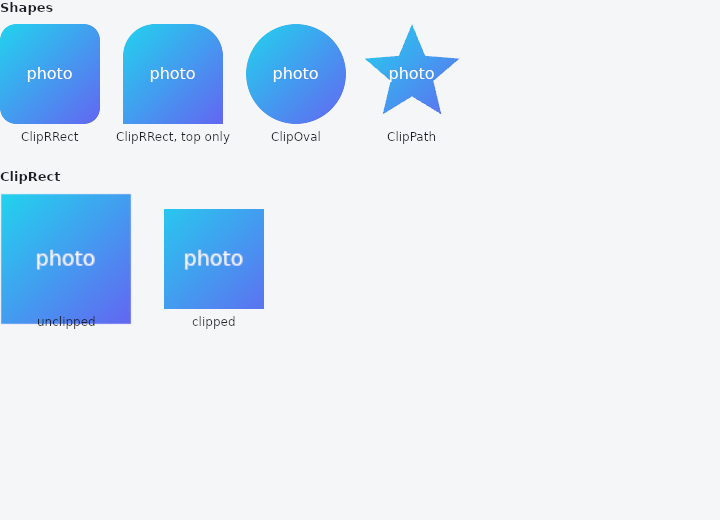
From frus-examples/widgets/src/features/painting/widgets/clip.rs:
//! `ClipRect`, `ClipRRect`, `ClipOval` and `ClipPath` — cut a child's painting to a
//! shape: rounded corners on a picture, a round avatar, a star.
//!
//! A clip changes what is painted, never the layout: the box keeps its size, only the
//! pixels outside the shape are dropped.

use frus::{
    Alignment, BorderRadius, BoxDecoration, ClipOval, ClipPath, ClipRRect, ClipRect, Color, Column,
    Container, LinearGradient, Padding, Path, Point, Text, Transform, Widget, Wrap,
};

use crate::common::shared::{section, sections};

pub fn example() -> Box<dyn Widget> {
    sections(vec![
        Box::new(section(
            "Shapes",
            Wrap::new()
                .gap(16.0)
                .run_gap(16.0)
                // Rounded corners — the same radius everywhere, or per corner.
                .child(labelled("ClipRRect", ClipRRect::new(16.0).child(picture())))
                .child(labelled(
                    "ClipRRect, top only",
                    ClipRRect::rounded(BorderRadius::top(32.0)).child(picture()),
                ))
                // The ellipse inscribed in the box: a circle when the box is square.
                .child(labelled("ClipOval", ClipOval::new().child(picture())))
                // Any path, in the box's own coordinates (origin at its top-left).
                .child(labelled(
                    "ClipPath",
                    ClipPath::new(star(100.0, 100.0)).child(picture()),
                )),
        )),
        // `ClipRect` cuts at the box's edges. A child that paints past them — here one
        // scaled up 1.3× by a transform — stays inside instead of covering its
        // neighbours.
        Box::new(section(
            "ClipRect",
            Padding::new(
                16.0,
                Wrap::new()
                    .gap(48.0)
                    .run_gap(16.0)
                    .child(labelled(
                        "unclipped",
                        Transform::scale(1.3).child(picture()),
                    ))
                    .child(labelled(
                        "clipped",
                        ClipRect::new().child(Transform::scale(1.3).child(picture())),
                    )),
            ),
        )),
    ])
}

/// A 100 × 100 stand-in for a photo: a gradient with a caption.
fn picture() -> Container {
    Container::new()
        .width(100.0)
        .height(100.0)
        .decoration(
            BoxDecoration::default().gradient(
                LinearGradient::new(vec![Color::hex("#22D3EE"), Color::hex("#6366F1")])
                    .between(Alignment::TOP_LEFT, Alignment::BOTTOM_RIGHT),
            ),
        )
        .alignment(Alignment::CENTER)
        .child(Text::new("photo").color(Color::hex("#FFFFFF")))
}

/// A five-pointed star filling a `width` × `height` box.
fn star(width: f32, height: f32) -> Path {
    let (cx, cy) = (width / 2.0, height / 2.0);
    let outer = width.min(height) / 2.0;
    let inner = outer * 0.45;
    (0..10)
        .fold(Path::new(), |path, i| {
            let radius = if i % 2 == 0 { outer } else { inner };
            // Start at the top and go round clockwise, a tenth of a turn per point.
            let angle = -std::f32::consts::FRAC_PI_2 + i as f32 * std::f32::consts::PI / 5.0;
            let point = Point::new(cx + radius * angle.cos(), cy + radius * angle.sin());
            if i == 0 {
                path.move_to(point)
            } else {
                path.line_to(point)
            }
        })
        .close()
}

fn labelled(label: &str, child: impl Widget + 'static) -> Column {
    Column::new()
        .spacing(6.0)
        .child(child)
        .child(Text::new(label).size(12.0))
}
Properties
| Type | Method | Argument | Effect |
|---|---|---|---|
ClipRect | .child() | child: impl Widget<Msg> + 'static | Sets the clipped child. |
ClipRRect | .child() | child: impl Widget<Msg> + 'static | Sets the clipped child. |
ClipOval | .child() | child: impl Widget<Msg> + 'static | Sets the clipped child. |
ClipPath | .child() | child: impl Widget<Msg> + 'static | Sets the clipped child. |
Behaviour
ClipRect
Clips its child to its box: whatever the child paints past the box's edges is cut off — a picture larger than its frame, content sliding in from outside, a transform that moves something past the edge. Same layout rules as ClipRRect, with square corners.
use frus_widgets::{ClipRect, Text};

let _cropped: ClipRect<()> = ClipRect::new().child(Text::new("Cut at the edge"));
ClipRRect
Clips its child to a rounded rectangle — a radius per corner. The subtree is painted in a layer whose shape erases whatever overflows the corners (antialiased edges) — the building block of a thumbnail, a squircle avatar, a card with soft corners (or only the top rounded, like a rising sheet) whose content (an image, a gradient…) hugs the rounding exactly.
A pass-through in layout: the box takes the size the parent gives it (like its child), and the rounding is inscribed in that box. Each radius is clamped to half the smaller dimension (beyond that the corners meet — a stadium).
ClipRRect::new(12.0).child(Image::asset("photo.png"))              // uniform
ClipRRect::rounded(BorderRadius::top(16.0)).child(header)          // top rounded
ClipOval
Clips its child to an ellipse inscribed in its box (a circle if the box is square): the building block of a round avatar, a dot, a circular gauge whose content is cropped to the disc. Same layout rules as ClipRRect (a pass-through, with the shape inscribed in the box).
ClipOval::new().child(Image::asset("avatar.png"))
ClipPath
Clips its child to an arbitrary path: the subtree is painted in a layer where a mask (the path, rendered by the GPU) erases everything outside it — stars, pointed cut-outs, speech bubbles, free-form shapes, with antialiased edges.
The path is given in local coordinates (the origin at the top-left corner of the widget's box); the walk offsets it to the screen position. A layout pass-through, like ClipRRect.
// A diamond inscribed in a 100×100 box.
let diamond = Path::new()
    .move_to(Point::new(50.0, 0.0))
    .line_to(Point::new(100.0, 50.0))
    .line_to(Point::new(50.0, 100.0))
    .line_to(Point::new(0.0, 50.0))
    .close();
ClipPath::new(diamond).child(Image::asset("photo.png"))
See also
- Gradients: linear, radial and sweep gradients, painted by a BoxDecoration.
- Elevation & shadows: the shadows a surface casts at a given height, and shadow blur styles.
- Transform & FractionalTranslation: moves, scales or rotates a child's painting without changing the layout.
- Opacity: paints a child partly transparent, as one layer.
- CustomPaint: a canvas you draw yourself, with paths, rectangles and the theme's colours.
- The guide: Text, colour and the theme
- API reference:
ClipRect - API reference:
ClipRRect - API reference:
ClipOval - API reference:
ClipPath
Source: crates/frus-widgets/src/boxes.rs, crates/frus-widgets/src/clip.rs, crates/frus-widgets/src/clip.rs, crates/frus-widgets/src/clip.rs @ e6fba33f5b42