Elevation & shadows
Purpose
The shadows a surface casts at a given height, and shadow blur styles.
Signature
This demo shows a pattern rather than one type. The names it uses are in the example below, and each one is in the API reference.
Example
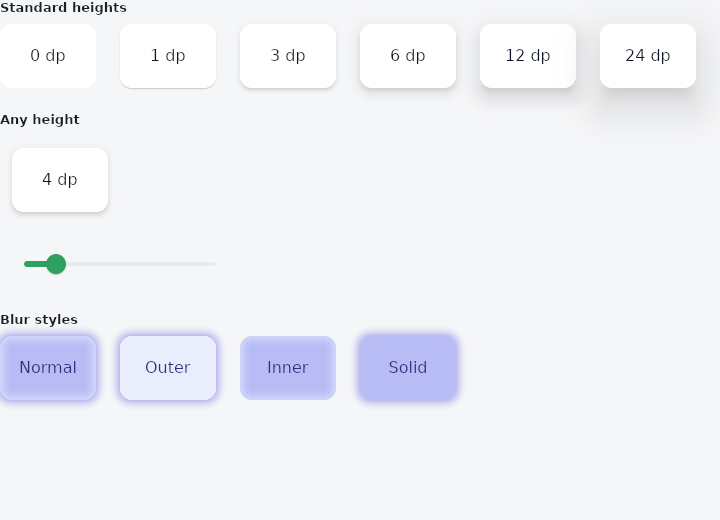
From frus-examples/widgets/src/features/painting/widgets/elevation.rs:
//! Elevation — the shadows a surface casts at a given height above the page, from the
//! standard table: `BoxShadow::for_elevation(height, colour)`.
//!
//! Cards, menus, dialogs and buttons use these heights. Use the same function for your
//! own surfaces so they sit in the same light as the built-in ones.

use frus::{
    component, Align, Alignment, BlurStyle, BoxShadow, Color, Column, Container, Padding, Slider,
    Text, Widget, Wrap,
};

use crate::common::shared::{section, sections};

pub fn example() -> Box<dyn Widget> {
    sections(vec![
        // Three shadows per height — a sharp one close under the surface, a softer one
        // further down, a wide faint one all round — in the colour given at full strength.
        Box::new(section(
            "Standard heights",
            // The gaps leave room for the shadows, which paint outside each surface.
            Wrap::new()
                .gap(24.0)
                .run_gap(24.0)
                .child(surface(0.0))
                .child(surface(1.0))
                .child(surface(3.0))
                .child(surface(6.0))
                .child(surface(12.0))
                .child(surface(24.0)),
        )),
        // Heights between the table's rows are interpolated, so an elevation can animate
        // or follow a value smoothly.
        Box::new(section("Any height", live())),
        // A shadow's blur style: `Normal` blurs both ways; `Outer` keeps only what lies
        // outside the shape; `Inner` only what lies inside it; `Solid` keeps the shape
        // solid and blurs outwards.
        Box::new(section(
            "Blur styles",
            Wrap::new()
                .gap(24.0)
                .run_gap(24.0)
                .child(styled("Normal", BlurStyle::Normal))
                .child(styled("Outer", BlurStyle::Outer))
                .child(styled("Inner", BlurStyle::Inner))
                .child(styled("Solid", BlurStyle::Solid)),
        )),
    ])
}

fn live() -> impl Widget {
    component(|cx| {
        let height = cx.use_state(|| 4.0_f32);
        let value = height.get();
        Box::new(
            Column::new()
                .spacing(16.0)
                .cross_axis_alignment(Align::Start)
                .child(Padding::new(12.0, surface(value)))
                .child(
                    Slider::new(value)
                        .range(0.0, 24.0)
                        .width(240.0)
                        .on_change(move |v| height.set(v)),
                ),
        )
    })
}

fn surface(elevation: f32) -> Container {
    Container::new()
        .width(96.0)
        .height(64.0)
        .radius(12.0)
        .color(Color::hex("#FFFFFF"))
        .shadows(BoxShadow::for_elevation(elevation, Color::hex("#000000")))
        .alignment(Alignment::CENTER)
        .child(Text::new(format!("{elevation:.0} dp")).color(Color::hex("#0F172A")))
}

fn styled(label: &str, style: BlurStyle) -> Container {
    Container::new()
        .width(96.0)
        .height(64.0)
        .radius(12.0)
        .color(Color::hex("#E0E7FF").fade(0.6))
        .shadows([BoxShadow::new(0.0, 0.0, 12.0, Color::hex("#4F46E5")).blur_style(style)])
        .alignment(Alignment::CENTER)
        .child(Text::new(label).color(Color::hex("#312E81")))
}
Properties
See the example.
Behaviour
The example shows it at work; the API reference has every method.
See also
- DecoratedBox & ColoredBox: paints a fill, rounded corners, borders and shadows behind or in front of a child.
- Gradients: linear, radial and sweep gradients, painted by a BoxDecoration.
- ClipRect, ClipRRect, ClipOval & ClipPath: cuts a child's painting to a rectangle, rounded corners, an oval or any path.
- Transform & FractionalTranslation: moves, scales or rotates a child's painting without changing the layout.
- Opacity: paints a child partly transparent, as one layer.
- The guide: Text, colour and the theme
Source: frus-examples/widgets/src/features/painting/widgets/elevation.rs @ e6fba33f5b42