ImageFiltered
Purpose
Blurs a child, or grows and shrinks its shapes.
Signature
pub struct ImageFiltered<Msg = crate::callback::Callback> { .. }

impl ImageFiltered {
    pub fn new(filter: ImageFilter) -> Self;
    pub fn blur(sigma: f32) -> Self;
}
Example
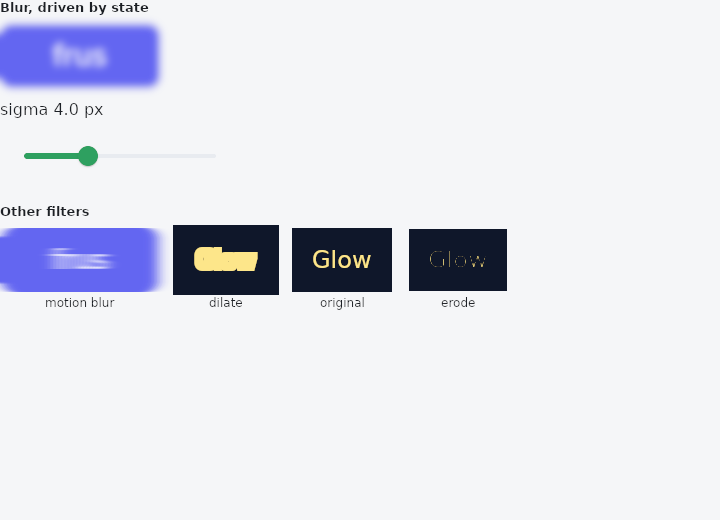
From frus-examples/widgets/src/features/painting/widgets/image_filtered.rs:
//! `ImageFiltered` — treats a child as an image and filters it: a blur, or shapes
//! grown (dilate) or shrunk (erode).
//!
//! It filters the widget itself; to blur what lies *behind* a widget, use
//! `BackdropFilter`.

use frus::{
    component, Align, Alignment, Color, Column, Container, ImageFilter, ImageFiltered, Slider,
    Text, Widget, Wrap,
};

use crate::common::shared::{section, sections};

pub fn example() -> Box<dyn Widget> {
    sections(vec![
        // Live: the slider sets the blur's sigma, in logical pixels. At zero the filter is
        // switched off with `enabled(false)` — a zero blur would still cost a layer.
        Box::new(section("Blur, driven by state", live_blur())),
        // Separate sigmas per axis make a directional smear; dilate and erode grow or
        // shrink the light shapes — the bases of a glow or a thinner outline.
        Box::new(section(
            "Other filters",
            Wrap::new()
                .gap(16.0)
                .run_gap(16.0)
                .child(labelled(
                    "motion blur",
                    ImageFiltered::new(ImageFilter::Blur {
                        sigma_x: 6.0,
                        sigma_y: 0.0,
                    })
                    .child(badge()),
                ))
                .child(labelled(
                    "dilate",
                    ImageFiltered::new(ImageFilter::Dilate {
                        radius_x: 3.0,
                        radius_y: 3.0,
                    })
                    .child(outlined()),
                ))
                .child(labelled("original", outlined()))
                .child(labelled(
                    "erode",
                    ImageFiltered::new(ImageFilter::Erode {
                        radius_x: 1.0,
                        radius_y: 1.0,
                    })
                    .child(outlined()),
                )),
        )),
    ])
}

fn live_blur() -> impl Widget {
    component(|cx| {
        let sigma = cx.use_state(|| 4.0_f32);
        let value = sigma.get();
        Box::new(
            Column::new()
                .spacing(12.0)
                .cross_axis_alignment(Align::Start)
                .child(
                    ImageFiltered::blur(value)
                        .enabled(value > 0.0)
                        .child(badge()),
                )
                .child(Text::new(format!("sigma {value:.1} px")))
                .child(
                    Slider::new(value)
                        .range(0.0, 12.0)
                        .width(240.0)
                        .on_change(move |v| sigma.set(v)),
                ),
        )
    })
}

fn badge() -> Container {
    Container::new()
        .width(160.0)
        .height(64.0)
        .radius(12.0)
        .color(Color::hex("#6366F1"))
        .alignment(Alignment::CENTER)
        .child(Text::new("frus").size(28.0).color(Color::hex("#FFFFFF")))
}

/// Light text on a dark box: dilate fattens the letters, erode thins them.
fn outlined() -> Container {
    Container::new()
        .width(100.0)
        .height(64.0)
        .color(Color::hex("#0F172A"))
        .alignment(Alignment::CENTER)
        .child(Text::new("Glow").size(24.0).color(Color::hex("#FDE68A")))
}

fn labelled(label: &str, child: impl Widget + 'static) -> Column {
    Column::new()
        .spacing(4.0)
        .child(child)
        .child(Text::new(label).size(12.0))
}
Properties
| Method | Argument | Effect |
|---|---|---|
.child() | child: impl Widget<Msg> + 'static | Sets the filtered child. |
.enabled() | enabled: bool | Turns the filter off: the child is painted as if this widget were not there. |
Behaviour
Applies an ImageFilter to its child: a blur, a dilate, an erode.
The result depends on a pixel's neighbours, so the child is treated as an image — which is why the effect spreads beyond the child's box, and why a caller who wants it contained wraps this in a clip.
This is the cheap way to blur one thing. BackdropFilter blurs everything painted beneath it, which is a different and much more expensive question; when the answer wanted is "blur this widget", it is this one.
ImageFiltered::blur(8.0).child(Image::asset("photo.png"))
ImageFiltered::new(ImageFilter::Dilate { radius_x: 2.0, radius_y: 2.0 }).child(logo)
See also
- ShaderMask: lays a gradient over a child's pixels: gradient text, fades, spotlights.
- ColorFiltered: changes the colours of everything a child paints.
- BackdropFilter: blurs what is painted underneath: frosted glass.
- The guide: Text, colour and the theme
- API reference:
ImageFiltered
Source: crates/frus-widgets/src/filters.rs @ e6fba33f5b42