Transform and FractionalTranslation
Purpose
Moves, scales or rotates a child's painting without changing the layout.
Signature
pub struct Transform<Msg = crate::callback::Callback> { .. }

impl Transform {
    pub fn translate(dx: f32, dy: f32) -> Self;
    pub fn scale(factor: f32) -> Self;
    pub fn scale_xy(sx: f32, sy: f32) -> Self;
    pub fn scale_from(factor: f32, pivot: Alignment) -> Self;
    pub fn scale_xy_from(sx: f32, sy: f32, pivot: Alignment) -> Self;
    pub fn rotate(radians: f32) -> Self;
    pub fn rotate_from(radians: f32, pivot: Alignment) -> Self;
}
pub struct FractionalTranslation<Msg = crate::callback::Callback> { .. }

impl FractionalTranslation {
    pub fn new(fx: f32, fy: f32) -> Self;
}
Example
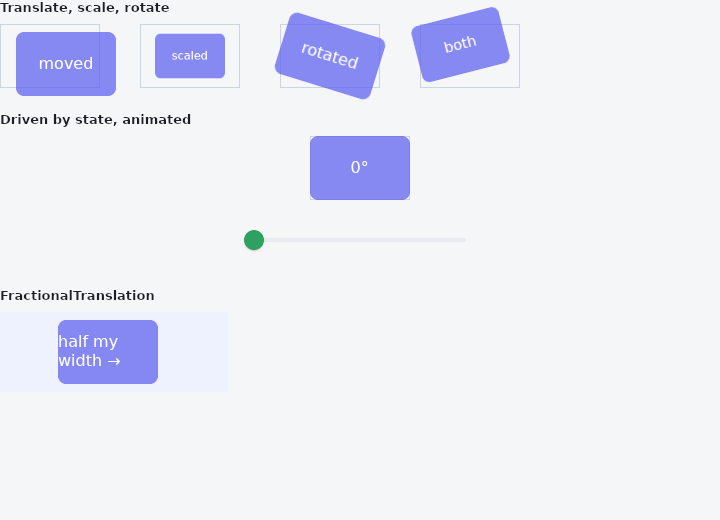
From frus-examples/widgets/src/features/painting/widgets/transform.rs:
//! `Transform` and `FractionalTranslation` — move, scale or rotate a child's painting
//! without changing the layout around it.
//!
//! The neighbours still see the untransformed box; use `RotatedBox` when the layout
//! should turn too. Taps follow the transformed child.

use frus::{
    component, Alignment, Clip, Color, Column, Container, Curve, FractionalTranslation, Slider,
    Stack, StackFit, Text, Transform, Widget, Wrap,
};

use crate::common::shared::{section, sections};

pub fn example() -> Box<dyn Widget> {
    sections(vec![
        Box::new(section(
            "Translate, scale, rotate",
            Wrap::new()
                .gap(40.0)
                .run_gap(24.0)
                .child(slot(Transform::translate(16.0, 8.0).child(card("moved"))))
                .child(slot(Transform::scale(0.7).child(card("scaled"))))
                .child(slot(Transform::rotate(0.3).child(card("rotated"))))
                // Combined, and turned about a corner instead of the centre.
                .child(slot(
                    Transform::rotate_from(-0.25, Alignment::BOTTOM_LEFT)
                        .and_scale(0.9)
                        .child(card("both")),
                )),
        )),
        // Live: the slider sets the angle; `animated` eases to each new value — the way a
        // pressed button shrinks a little, or a chevron turns when a panel opens.
        Box::new(section("Driven by state, animated", spinner())),
        // `FractionalTranslation` moves by a fraction of the child's own size: (0.5, 0)
        // shifts it right by half its width, whatever that width is.
        Box::new(section(
            "FractionalTranslation",
            Container::new()
                .padding_each(8.0, 120.0, 8.0, 8.0)
                .color(Color::hex("#EEF2FF"))
                .child(FractionalTranslation::new(0.5, 0.0).child(card("half my width →"))),
        )),
    ])
}

fn spinner() -> impl Widget {
    component(|cx| {
        let degrees = cx.use_state(|| 0.0_f32);
        let angle = degrees.get();
        Box::new(
            Column::new()
                .spacing(16.0)
                .child(slot(
                    Transform::rotate(angle.to_radians())
                        .animated(0.2, Curve::ease_out())
                        .child(card(&format!("{angle:.0}°"))),
                ))
                .child(
                    Slider::new(angle)
                        .range(0.0, 360.0)
                        .width(260.0)
                        .on_change(move |value| degrees.set(value)),
                ),
        )
    })
}

/// A fixed slot with a faint outline: the box the layout sees. The outline is a layer of
/// its own, under the child, so its border does not take room from the card; and the
/// stack does not clip, so the transformed card can paint past the slot.
fn slot(child: impl Widget + 'static) -> Stack {
    Stack::new()
        .width(100.0)
        .height(64.0)
        .fit(StackFit::Expand)
        .clip_behavior(Clip::None)
        .layer(Container::new().border(1.0, Color::hex("#CBD5E1")))
        .layer(child)
}

fn card(label: &str) -> Container {
    Container::new()
        .width(100.0)
        .height(64.0)
        .radius(8.0)
        .color(Color::hex("#6366F1").fade(0.85))
        .alignment(Alignment::CENTER)
        .child(Text::new(label).color(Color::hex("#FFFFFF")))
}
Properties
| Type | Method | Argument | Effect |
|---|---|---|---|
Transform | .and_translate() | dx: f32, dy: f32 | Adds a translation to the current transformation (composition): Transform::scale(1.2).and_translate(0, -4) enlarges and moves up. |
Transform | .and_scale() | factor: f32 | Adds a uniform scaling (about the centre) to the current transformation. |
Transform | .and_scale_xy() | sx: f32, sy: f32 | Adds a per-axis scaling (about the centre) to the current transformation. |
Transform | .and_rotate() | radians: f32 | Adds a rotation (about the centre) to the current transformation: Transform::scale(1.5).and_rotate(0.2) enlarges and rotates. |
Transform | .animated() | duration: f32, curve: Curve | Moves to this transform rather than jumping to it, over duration seconds along curve. |
Transform | .child() | child: impl Widget<Msg> + 'static | Sets the transformed child. |
FractionalTranslation | .animated() | duration: f32, curve: Curve | Slides to each new fraction over duration instead of jumping to it, on the framework's own clock. See crate::AnimatedSlide, which is this and a name. |
FractionalTranslation | .child() | child: impl Widget<Msg> + 'static | Sets the child, replacing any already there. |
Behaviour
Transform
Transforms its child at paint time (both rendering and hit-testing), without changing layout: the siblings do not move, and the child may overflow its box, since there is no clipping.
Two transformations, each combinable with a Tween read in view() to animate: - translate(dx, dy) — offsets the subtree (a dot in a corner, an entry that slides in, an error shake…). - scale(factor) / scale_xy(sx, sy) — scales the subtree about a pivot (the centre by default), uniformly or per axis (stretching, flattening): a button's "pop" effect, a thumbnail zoom. - rotate(radians) — rotates the subtree about a pivot (the centre by default): a needle, a chevron that flips, a spinner.
Scale and rotation (and their composition) are melted into a single affine matrix carried by a transformed composited layer; hit-testing applies the inverse matrix to the point. They compose within one widget through the chainers and_translate, and_scale / and_scale_xy, and_rotate — applied in the order translation → scale → rotation (the translation innermost, through the child offset). So Transform::scale(1.5).and_rotate(0.2) enlarges and rotates, exactly, with no composition approximation.
FractionalTranslation
Offsets its child by a fraction of the child's own size, at paint time, without touching layout.
FractionalTranslation::new(0.5, 0.0) slides the subtree half its own width to the right; (-1.0, 0.0) slides it a whole width to the left, exactly clear of where it was. Like Transform::translate, it moves the render and the hit-test, and it moves nothing else: the box stays where the layout put it and the siblings do not budge.
The reason it exists next to Transform::translate is that the number is not known where the widget is written. A panel that has to sit exactly off the edge of itself, a badge half outside its anchor, a row that slides its own width aside to uncover what is under it — each of those is a multiple of a size the layout decides, and a caller that had to pass pixels would be passing a guess.
// A panel parked one full width off the left, sliding in as `open` runs 0 → 1.
FractionalTranslation::new(open - 1.0, 0.0).child(panel())
In a right-to-left script the horizontal fraction follows the reading direction, as Transform::translate does: a positive x moves towards the end of the line.
See also
- Elevation & shadows: the shadows a surface casts at a given height, and shadow blur styles.
- ClipRect, ClipRRect, ClipOval & ClipPath: cuts a child's painting to a rectangle, rounded corners, an oval or any path.
- Opacity: paints a child partly transparent, as one layer.
- CustomPaint: a canvas you draw yourself, with paths, rectangles and the theme's colours.
- ShaderMask: lays a gradient over a child's pixels: gradient text, fades, spotlights.
- The guide: Text, colour and the theme
- API reference:
Transform - API reference:
FractionalTranslation
Source: crates/frus-widgets/src/transform.rs, crates/frus-widgets/src/transform.rs @ e6fba33f5b42