ListWheel
Purpose
A spinning cylinder of values to pick one from.
Signature
pub struct ListWheel<Msg = crate::callback::Callback> { .. }

impl ListWheel {
    pub fn new<W: Widget<Msg> + 'static>(
        count: usize,
        extent: f32,
        build: impl Fn(usize) -> W + 'static,
    ) -> Self;
}
Example
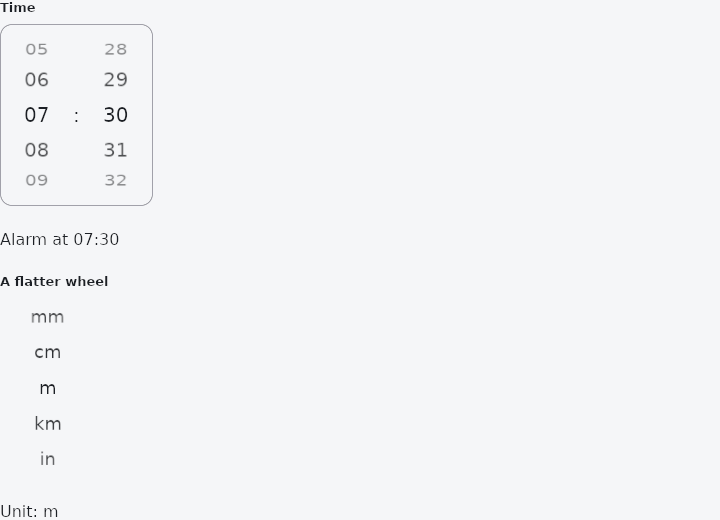
From frus-examples/widgets/src/features/scrolling/widgets/listwheel.rs:
//! `ListWheel` — the spinning cylinder of values you turn to pick one: the control
//! behind time and duration pickers, and the one to reach for a picker of your own.

use frus::{Center, Color, Container, ListWheel, Row, Text, Widget};

use crate::common::shared::{section, sections};

const UNITS: [&str; 5] = ["mm", "cm", "m", "km", "in"];

pub fn example() -> Box<dyn Widget> {
    Box::new(frus::component(|cx| {
        let hours = cx.use_state(|| 7usize);
        let minutes = cx.use_state(|| 30usize);
        let unit = cx.use_state(|| 2usize);

        // `selected` is the app's value (applied on the first frame and on every change);
        // `on_selected` reports the row the wheel came to rest on. Rows are built from
        // their index, and `label` says what each is to a screen reader.
        let set_hours = hours.clone();
        let hour_wheel = ListWheel::new(24, 36.0, |i| {
            Center::new(Text::new(format!("{i:02}")).size(20.0))
        })
        .selected(hours.get())
        .on_selected(move |i: usize| set_hours.set(i))
        .label(|i| format!("{i} hours"))
        .width(72.0)
        .height(180.0);

        let set_minutes = minutes.clone();
        let minute_wheel = ListWheel::new(60, 36.0, |i| {
            Center::new(Text::new(format!("{i:02}")).size(20.0))
        })
        .selected(minutes.get())
        .on_selected(move |i: usize| set_minutes.set(i))
        .label(|i| format!("{i} minutes"))
        .width(72.0)
        .height(180.0);

        // A flatter cylinder: a larger `diameter_ratio` curves the rows less.
        let set_unit = unit.clone();
        let unit_wheel = ListWheel::new(UNITS.len(), 36.0, |i| {
            Center::new(Text::new(UNITS[i]).size(18.0))
        })
        .selected(unit.get())
        .on_selected(move |i: usize| set_unit.set(i))
        .label(|i| UNITS[i].to_string())
        .diameter_ratio(3.0)
        .width(96.0)
        .height(180.0);

        sections(vec![
            Box::new(section(
                "Time",
                Container::new()
                    .border(1.0, Color::hex("#A1A1AA"))
                    .radius(12.0)
                    .child(
                        Row::new()
                            .main_axis_size(frus::MainAxisSize::Min)
                            .child(hour_wheel)
                            .child(Text::new(":").size(20.0))
                            .child(minute_wheel),
                    ),
            )),
            Box::new(Text::new(format!(
                "Alarm at {:02}:{:02}",
                hours.get(),
                minutes.get()
            ))),
            Box::new(section("A flatter wheel", unit_wheel)),
            Box::new(Text::new(format!("Unit: {}", UNITS[unit.get()]))),
        ])
    }))
}
Properties
| Method | Argument | Effect |
|---|---|---|
.selected() | index: usize | The row the application says is chosen. Applied on the first frame and on every change, the way crate::PageView::page is — so a wheel opens on the value it holds rather than on the first one and then jumping. |
.on_selected() | message: impl Fn(usize) -> R + 'static | What to send when the wheel comes to rest on a different row. |
.label() | label: impl Fn(usize) -> String + 'static | What each row is called, for a reader who cannot see it. |
.diameter_ratio() | ratio: f32 | How curved the cylinder is: the diameter as a multiple of the wheel's own height. |
.perspective() | perspective: f32 | How much a receding row narrows. 0.0 for none. |
.physics() | physics: ScrollPhysics | The scroll physics of the spin — its scroll behaviour's by default (ScrollBehavior). |
.width() | width: f32 | A fixed width. |
.height() | height: f32 | A fixed height. A wheel needs one: it is a window onto a cylinder, and a window that hugged its content would be the whole strip. |
.flex() | grow: f32 | Grows to fill the space its parent has left along the main axis. |
Behaviour
A scrolling cylinder of rows, resting on one of them. See the module documentation.
use frus_widgets::{text, ListWheel};

let _minutes: ListWheel<usize> = ListWheel::new(60, 34.0, |i| text(format!("{i:02}")))
    .height(180.0)
    .selected(15)
    .on_selected(|i| i)
    .label(|i| format!("{i} minutes"));
See also
- ExpansionPanelList: panels drawn as one surface that splits apart as one opens.
- StickyHeader: section headers that stay at the top while their section is in view.
- Kanban: a board of columns and cards, with drag and drop between columns.
- RefreshIndicator: pull a list down past its top to refresh it.
- Programmatic scrolling: read where a list is with on_scroll, and move it with scroll_to.
- The guide: Lists and grids
- API reference:
ListWheel
Source: crates/frus-widgets/src/wheel.rs @ e6fba33f5b42