RefreshIndicator
Purpose
Pull a list down past its top to refresh it.
Signature
pub struct RefreshIndicator<Msg = crate::callback::Callback> { .. }

impl RefreshIndicator {
    pub fn new(child: impl Widget<Msg> + 'static) -> Self;
}
Example
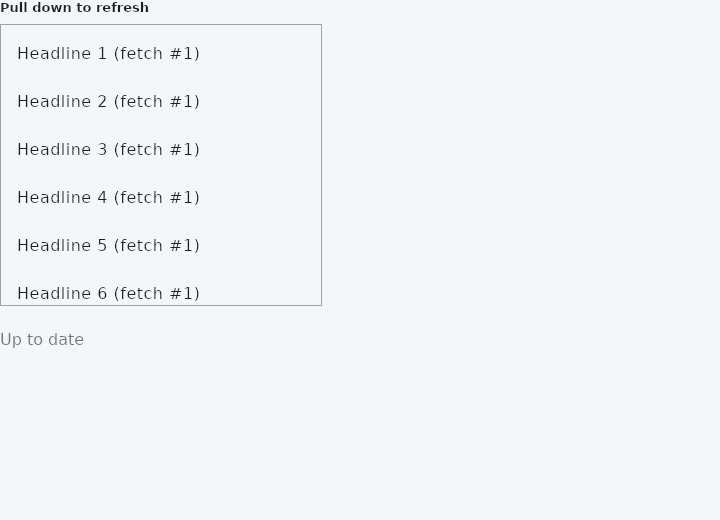
From frus-examples/widgets/src/features/scrolling/widgets/refresh.rs:
//! `RefreshIndicator` — pull a list down past its top to ask for fresh data. The app
//! decides when the answer has arrived: the spinner turns for as long as it says
//! `refreshing(true)`.

use std::time::Duration;

use frus::{Color, Container, ListTile, ListView, RefreshIndicator, Text, Widget};

use crate::common::shared::{section, sections};

pub fn example() -> Box<dyn Widget> {
    Box::new(frus::component(|cx| {
        let loading = cx.use_state(|| false);
        let version = cx.use_state(|| 1u32);

        // `on_refresh` is sent when the finger lets go past the threshold. Here a timer
        // stands in for a network call; a real app would start a request, then clear
        // `loading` when it answers.
        let (start, done, bump) = (loading.clone(), loading.clone(), version.clone());
        let on_refresh = move || {
            start.set(true);
            let (done, bump) = (done.clone(), bump.clone());
            frus::host::after(Duration::from_millis(1500), move || {
                bump.update(|v| *v += 1);
                done.set(false);
            });
        };

        let shown = version.get();
        let list = ListView::new(20, 48.0, move |i| {
            ListTile::new().title(format!("Headline {} (fetch #{shown})", i + 1))
        })
        .width(320.0)
        .height(280.0);

        sections(vec![
            Box::new(section(
                "Pull down to refresh",
                Container::new().border(1.0, Color::hex("#A1A1AA")).child(
                    RefreshIndicator::new(list)
                        .on_refresh(on_refresh)
                        .refreshing(loading.get()),
                ),
            )),
            Box::new(
                Text::new(if loading.get() {
                    "Refreshing…"
                } else {
                    "Up to date"
                })
                .color(cx.theme().muted),
            ),
        ])
    }))
}
Properties
| Method | Argument | Effect |
|---|---|---|
.on_refresh() | message: impl Into<Msg> | The message dispatched when an armed pull is released. |
.refreshing() | refreshing: bool | Whether the application is currently working. The indicator spins for exactly as long as this is true. |
.displacement() | displacement: f32 | Where the indicator rests while it spins, in px below the top edge. |
.size() | size: f32 | The indicator's diameter, in px. |
.color() | color: Color | The ring's colour, overriding the theme's primary. |
.background() | color: Color | The disc behind the ring, overriding the theme's surface. |
Behaviour
Wraps a scrollable so that pulling it past its top edge asks for fresh data.
RefreshIndicator::new(SingleChildScrollView::new().child(rows))
    .on_refresh(Msg::Reload)
    .refreshing(self.loading)
    .color(theme.scheme.tertiary)     // every part is overridable
The child does not have to be a SingleChildScrollView directly — any scrollable anywhere inside feeds the pull, which is what lets a screen keep its own layout around the list.
See also
- ListWheel: a spinning cylinder of values to pick one from.
- Kanban: a board of columns and cards, with drag and drop between columns.
- Programmatic scrolling: read where a list is with on_scroll, and move it with scroll_to.
- ScrollOverlay: something drawn over a scroll region, rebuilt from its offset.
- Scroll physics & scrollbars: edge physics, scrollbars and overscroll, per scrollable or per subtree.
- The guide: Lists and grids
- API reference:
RefreshIndicator
Source: crates/frus-widgets/src/refresh.rs @ e6fba33f5b42