ReorderableList
Purpose
A list whose rows can be dragged into a new order.
Signature
pub struct ReorderableList<Msg = crate::callback::Callback> { .. }

impl ReorderableList {
    pub fn new<R: crate::callback::IntoMsg<Msg>>(
        on_reorder: impl Fn(usize, usize) -> R + 'static,
    ) -> Self;
}
Example
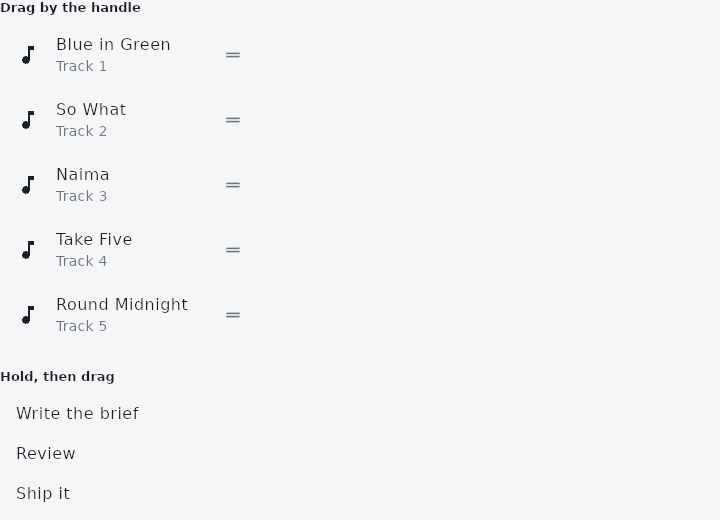
From frus-examples/widgets/src/features/scrolling/widgets/reorderable.rs:
//! `ReorderableList` — a list whose rows can be dragged into a new order: a playlist, a
//! set of favourites, a to-do list. The order is the app's; the list reports each move.

use frus::{
    Align, Column, Container, Icon, Icons, ListTile, ReorderGrab, ReorderableList, Text, Widget,
};

use crate::common::shared::{section, sections};

pub fn example() -> Box<dyn Widget> {
    Box::new(frus::component(|cx| {
        let songs = cx.use_state(|| {
            vec![
                "Blue in Green",
                "So What",
                "Naima",
                "Take Five",
                "Round Midnight",
            ]
        });
        let tasks = cx.use_state(|| vec!["Write the brief", "Review", "Ship it"]);

        // `on_reorder(from, to)`: `to` is where the row ends up, already accounting for
        // the row having left its old place — remove, then insert.
        let reorder = songs.clone();
        let playlist = songs.get().into_iter().enumerate().fold(
            ReorderableList::new(move |from: usize, to: usize| {
                reorder.update(|list| move_item(list, from, to))
            })
            // A grip at the trailing edge lifts the row on press; the rest of the row
            // keeps its taps and the list keeps scrolling.
            .grab(ReorderGrab::Handle)
            .gap(4.0),
            // A key per row lets the list keep track of a row as it moves.
            |list, (i, title)| {
                list.keyed_row(
                    key_of(title),
                    ListTile::new()
                        .leading(Icon::new(Icons::MUSIC_NOTE))
                        .title(title)
                        .subtitle(format!("Track {}", i + 1)),
                )
            },
        );

        // `LongPress`: hold anywhere on the row to lift it — the touch-screen default.
        let reorder_tasks = tasks.clone();
        let todo = tasks.get().into_iter().fold(
            ReorderableList::new(move |from: usize, to: usize| {
                reorder_tasks.update(|list| move_item(list, from, to))
            })
            .grab(ReorderGrab::LongPress),
            |list, task| list.keyed_row(key_of(task), ListTile::new().title(task)),
        );

        sections(vec![
            Box::new(section(
                "Drag by the handle",
                Container::new().width(320.0).child(playlist),
            )),
            Box::new(section(
                "Hold, then drag",
                Column::new()
                    .spacing(8.0)
                    .cross_axis_alignment(Align::Start)
                    .child(Container::new().width(320.0).child(todo))
                    .child(Text::new(format!("Order: {}", tasks.get().join(" → "))).wrap()),
            )),
        ])
    }))
}

/// Moves the item at `from` so that it ends up at `to`.
pub fn move_item<T>(list: &mut Vec<T>, from: usize, to: usize) {
    if from < list.len() {
        let item = list.remove(from);
        list.insert(to.min(list.len()), item);
    }
}

/// A stable key for a row: here the text itself, which is unique in these lists. A real
/// app uses its own id.
pub fn key_of(text: &str) -> u64 {
    use std::hash::{Hash, Hasher};
    let mut hasher = std::collections::hash_map::DefaultHasher::new();
    text.hash(&mut hasher);
    hasher.finish()
}
Properties
| Method | Argument | Effect |
|---|---|---|
.keyed_row() | key: u64, row: impl Widget<Msg> + 'static | Adds a row, identified by key. |
.row() | row: impl Widget<Msg> + 'static | Adds a row with no key of its own — for a list that never changes length. |
.grab() | grab: ReorderGrab | How a row is picked up. |
.axis() | axis: ReorderAxis | The way the rows run, ReorderAxis::Vertical by default. A horizontal list lays its rows out along x, puts each grip under its row, and is reordered across: see the module's notes for what that means under a right-to-left layout. |
.enabled() | enabled: bool | Turns reordering off without changing the list: no grip, no hold, no drop target. A list that is briefly read-only stays the same widget, so its rows keep their state. |
.handle() | handle: impl Fn(&Theme) -> W + 'static | The whole grip, replaced by a widget of the application's. It is built with the ambient theme, and what it is made of is nobody's business but the caller's — this widget only says where it goes and what grabbing it means. |
.handle_icon() | icon: IconData | The grip's glyph, over the theme's and the framework's. |
.handle_color() | color: Color | The grip's colour, over the theme's. |
.handle_icon_size() | size: f32 | The grip's glyph size. |
.handle_width() | width: f32 | The depth of the grip's box — its tap target, which is not the size of the glyph inside it. A width beside the rows of a vertical list, a height under the rows of a horizontal one. |
.gap() | gap: f32 | Space between rows. |
.width() | width: f32 | An explicit width. |
.width_fraction() | fraction: f32 | A width given as a fraction of what the parent offers. |
.height() | height: f32 | An explicit height. |
.flex() | grow: f32 | The share of a parent flex's spare room this list takes. |
Behaviour
A list whose rows can be dragged into a new order.
The order stays the application's, as everywhere else here: the list emits this row moved from from to to and the application permutes its own data. Nothing moves on screen until it does.
ReorderableList::new(|from, to| Msg::MoveTrack(from, to))
    .gap(8.0)
    .keyed_row(track.id, track_row(track))
Each row should carry a key — keyed_row, or a crate::keyed wrapper of your own. Rows are told apart by position otherwise, and a list whose rows are about to swap positions is exactly where that goes wrong: the hover and the animations of the row that moved would stay behind with its index.
See also
- PageView: a scrollable that always comes to rest on a page.
- CarouselView: one slide at a time between arrows, controlled by the app.
- Dismissible: swipe a row aside to archive or delete it.
- ExpansionTile: a list row that opens to show more; several make an accordion.
- ExpansionPanelList: panels drawn as one surface that splits apart as one opens.
- The guide: Lists and grids
- API reference:
ReorderableList
Source: crates/frus-widgets/src/reorderable.rs @ e6fba33f5b42