ScrollTo
Purpose
Read where a list is with on_scroll, and move it with scroll_to.
Signature
pub struct ScrollTo { .. }

impl ScrollTo {
    pub fn y(offset: f32) -> Self;
    pub fn x(offset: f32) -> Self;
    pub fn start() -> Self;
    pub fn end() -> Self;
    pub fn index(index: usize) -> Self;
}
Example
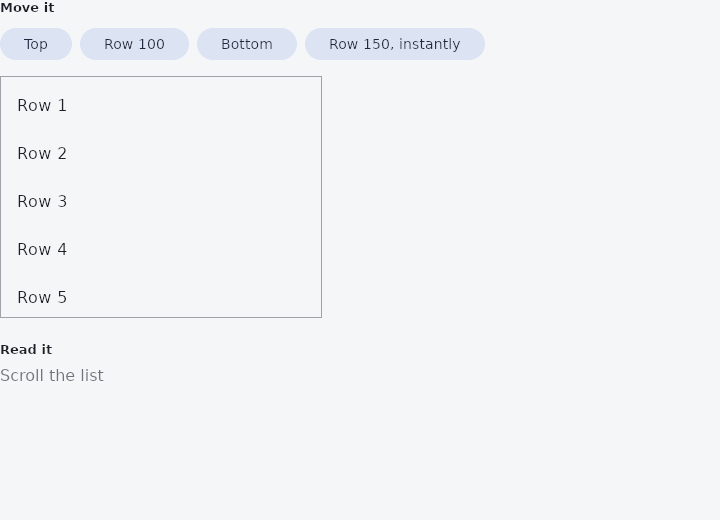
From frus-examples/widgets/src/features/scrolling/widgets/scrollto.rs:
//! Programmatic scrolling — reading where a scroll area is (`on_scroll` and
//! `ScrollPosition`) and moving it (`keyed` + `frus::host::scroll_to`): a "back to top"
//! button, jumping to an item, a chat that opens at its newest message.

use frus::{
    keyed, Align, Button, Color, Column, Container, ListTile, ListView, Row, ScrollPosition,
    ScrollTo, Text, Variant, Widget, Wrap,
};

use crate::common::shared::{section, sections};

/// The key that names the list, for requests to find it.
const LIST: &str = "scroll-to-demo-list";
const ROW: f32 = 48.0;
const COUNT: usize = 200;

pub fn example() -> Box<dyn Widget> {
    Box::new(frus::component(|cx| {
        let position = cx.use_state(|| None::<ScrollPosition>);

        // Reading: the list reports its position as it moves. `notify_every` limits the
        // messages to one per 24 px (plus where it comes to rest).
        let report = position.clone();
        let list = ListView::new(COUNT, ROW, |i| {
            ListTile::new().title(format!("Row {}", i + 1))
        })
        .height(240.0)
        .width(320.0)
        .on_scroll(move |p: ScrollPosition| report.set(Some(p)))
        .notify_every(24.0);

        // Moving: wrap the area in `keyed(key, …)` and send a request to that key. The
        // request is resolved on the next frame; `instant()` skips the animation.
        let controls = Wrap::new()
            .gap(8.0)
            .run_gap(8.0)
            .child(button("Top", || {
                frus::host::scroll_to(LIST, ScrollTo::start())
            }))
            .child(button("Row 100", || {
                frus::host::scroll_to(LIST, ScrollTo::y(99.0 * ROW))
            }))
            .child(button("Bottom", || {
                frus::host::scroll_to(LIST, ScrollTo::end())
            }))
            .child(button("Row 150, instantly", || {
                frus::host::scroll_to(LIST, ScrollTo::y(149.0 * ROW).instant())
            }));

        let status = match position.get() {
            Some(p) => format!(
                "{:.0}% down · {:.0} px left below",
                p.fraction_y() * 100.0,
                p.remaining_y()
            ),
            None => "Scroll the list".to_string(),
        };

        sections(vec![
            Box::new(section(
                "Move it",
                Column::new()
                    .spacing(12.0)
                    .cross_axis_alignment(Align::Start)
                    .child(controls)
                    .child(
                        Container::new()
                            .border(1.0, Color::hex("#A1A1AA"))
                            .child(keyed(LIST, list)),
                    ),
            )),
            Box::new(section(
                "Read it",
                Row::new()
                    .main_axis_size(frus::MainAxisSize::Min)
                    .child(Text::new(status).color(cx.theme().muted)),
            )),
        ])
    }))
}

fn button(label: &str, on_press: impl Fn() + 'static) -> Button {
    Button::new(label)
        .variant(Variant::Tonal)
        .on_press(on_press)
}
Properties
| Method | Argument | Effect |
|---|---|---|
.aligned() | align: f32 | Where in the window the item of ScrollTo::index comes to rest: 0.0 at its leading edge (the default), 0.5 in its middle, 1.0 at its far edge. |
.and_x() | target: ScrollTarget | Also moves the horizontal axis to target. |
.and_y() | target: ScrollTarget | Also moves the vertical axis to target. |
.instant() | — | Arrive rather than travel: no animation, the offset is simply there. |
Behaviour
A request to move a scroll region, addressed to one axis or both.
None on an axis leaves that axis where it is, which is what lets one type serve a vertical page, a sideways strip and the rare surface that scrolls both ways without a caller ever writing a coordinate it did not mean.
Carried by a command, resolved against the frame that follows it, and refused by a region a finger is holding — an offset has one owner at a time, and the finger is the one the reader can see.
See also
- Kanban: a board of columns and cards, with drag and drop between columns.
- RefreshIndicator: pull a list down past its top to refresh it.
- ScrollOverlay: something drawn over a scroll region, rebuilt from its offset.
- Scroll physics & scrollbars: edge physics, scrollbars and overscroll, per scrollable or per subtree.
- The guide: Lists and grids
- API reference:
ScrollTo
Source: crates/frus-widgets/src/scrollposition.rs @ e6fba33f5b42