SingleChildScrollView
Purpose
Makes one child scrollable: down, across or both ways.
Signature
pub struct SingleChildScrollView<Msg = crate::callback::Callback> { .. }

impl SingleChildScrollView {
    pub fn new() -> Self;
}
Example
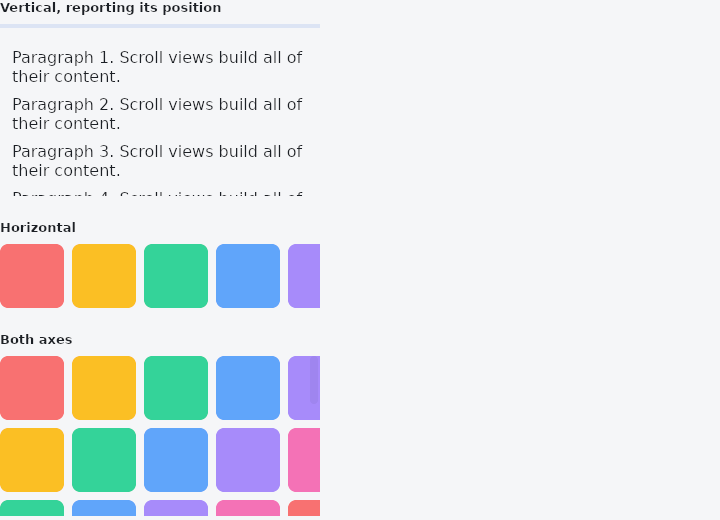
From frus-examples/widgets/src/features/scrolling/widgets/scrollview.rs:
//! `SingleChildScrollView` — makes one child scrollable when it is bigger than the room
//! it has: down, across, or both ways. It builds the whole child, so it suits content of
//! a known, modest size; long lists want `ListView`.

use frus::{
    Align, Axis, Color, Column, Container, LinearProgressIndicator, Row, ScrollPosition,
    SingleChildScrollView, Text, Widget,
};

use crate::common::shared::{section, sections};

pub fn example() -> Box<dyn Widget> {
    Box::new(frus::component(|cx| {
        let progress = cx.use_state(|| 0.0f32);

        // Inside a page that already scrolls, a scroll view needs a bounded size: give it
        // a height (or put it in a box that has one).
        let report = progress.clone();
        let vertical = SingleChildScrollView::new()
            .height(160.0)
            .width(320.0)
            .padding(12.0)
            // `on_scroll` reports where the area is as it moves.
            .on_scroll(move |position: ScrollPosition| report.set(position.fraction_y()))
            .child(paragraphs(12));

        // Sideways: a row wider than the screen.
        let horizontal = SingleChildScrollView::new()
            .axis(Axis::Horizontal)
            .width(320.0)
            .child((0..12).fold(Row::new().spacing(8.0), |row, i| row.child(swatch(i))));

        // Both ways at once, for a big canvas or a wide table. `thumb_visibility` keeps
        // the scrollbars on screen instead of fading out.
        let both = SingleChildScrollView::new()
            .axis(Axis::Both)
            .width(320.0)
            .height(160.0)
            .thumb_visibility(true)
            .child(
                (0..10).fold(
                    Column::new()
                        .cross_axis_alignment(Align::Start)
                        .spacing(8.0),
                    |column, r| {
                        column.child(
                            (0..10)
                                .fold(Row::new().spacing(8.0), |row, c| row.child(swatch(r + c))),
                        )
                    },
                ),
            );

        sections(vec![
            Box::new(section(
                "Vertical, reporting its position",
                Column::new()
                    .cross_axis_alignment(Align::Start)
                    .spacing(8.0)
                    .child(
                        Container::new()
                            .width(320.0)
                            .child(LinearProgressIndicator::new(progress.get())),
                    )
                    .child(vertical),
            )),
            Box::new(section("Horizontal", horizontal)),
            Box::new(section("Both axes", both)),
        ])
    }))
}

/// Enough text to scroll.
fn paragraphs(count: usize) -> Column {
    (1..=count).fold(
        Column::new()
            .cross_axis_alignment(Align::Start)
            .spacing(8.0),
        |column, i| {
            column.child(
                Text::new(format!(
                    "Paragraph {i}. Scroll views build all of their content."
                ))
                .wrap(),
            )
        },
    )
}

/// A coloured square, its hue picked from the index.
fn swatch(i: usize) -> Container {
    const HUES: [&str; 6] = [
        "#F87171", "#FBBF24", "#34D399", "#60A5FA", "#A78BFA", "#F472B6",
    ];
    Container::new()
        .width(64.0)
        .height(64.0)
        .radius(8.0)
        .color(Color::hex(HUES[i % HUES.len()]))
}
Properties
| Method | Argument | Effect |
|---|---|---|
.axis() | axis: Axis | Chooses the scrolling axis or axes; vertical by default. |
.reverse() | — | Scrolls from the far end: the content is anchored to the bottom of a vertical viewport (the right of a horizontal one) and the area starts there. |
.physics() | physics: ScrollPhysics | Overrides how this area behaves at its edges and after a fling. |
.scrollbars() | scrollbars: crate::physics::Scrollbars | Whether this area draws a scrollbar, over the application's answer. |
.thumb_visibility() | visible: bool | — |
.width() | width: f32 | Sets the viewport width, in logical pixels. |
.height() | height: f32 | Sets the viewport height, in logical pixels. |
.flex() | grow: f32 | Flex growth factor along the parent's main axis. |
.padding() | padding: f32 | Insets the content, inside the viewport: the padding scrolls with what it surrounds rather than shrinking the window onto it. |
.padding_each() | top: f32, right: f32, bottom: f32, left: f32 | The same, one side at a time. |
.on_scroll() | on_scroll: impl Fn(crate::ScrollPosition) -> R + 'static | Says where this area is whenever it moves — a "back to top" button that appears once the page has gone down, a rule that fills as it goes, a load-more when the end comes into view. |
.notify_every() | px: f32 | Reports no more often than every px of movement — and always reports where it comes to rest, however short the last step was. |
.child() | content: impl Widget<Msg> + 'static | Sets the scrollable content. |
Behaviour
A scrollable container.
See also
- ListView: a virtualised list: only the visible rows are built.
- GridView: cells in equal columns: a fixed count, as many as fit, or virtualised.
- PageView: a scrollable that always comes to rest on a page.
- The guide: Lists and grids
- API reference:
SingleChildScrollView
Source: crates/frus-widgets/src/scroll.rs @ e6fba33f5b42