StickyHeader
Purpose
Section headers that stay at the top while their section is in view.
Signature
pub struct StickyHeader<Msg = crate::callback::Callback> { .. }

impl StickyHeader {
    pub fn new(header: impl Widget<Msg> + 'static, content: impl Widget<Msg> + 'static) -> Self;
}
Example
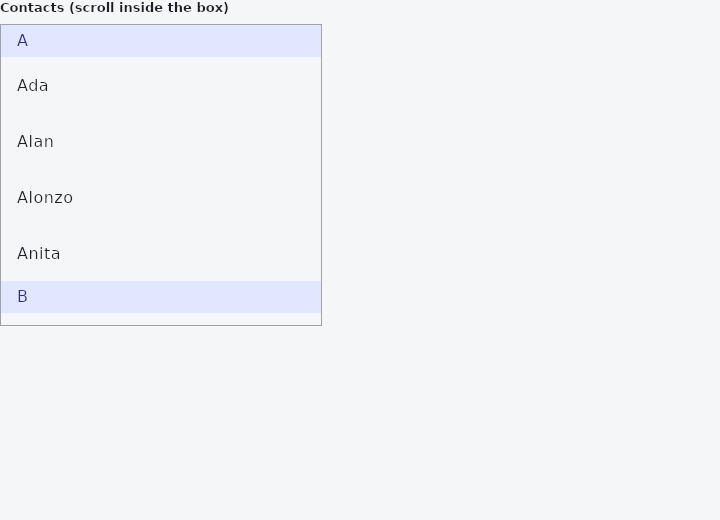
From frus-examples/widgets/src/features/scrolling/widgets/sticky.rs:
//! `StickyHeader` — a section header that stays at the top of a scroll view while its
//! section is in view, and is pushed off by the next section's header.

use frus::{
    Align, Color, Column, Container, ListTile, SingleChildScrollView, StickyHeader, Text, Widget,
};

use crate::common::shared::{section, sections};

const CONTACTS: [(&str, &[&str]); 5] = [
    ("A", &["Ada", "Alan", "Alonzo", "Anita"]),
    ("B", &["Barbara", "Bjarne", "Brian"]),
    ("D", &["Dennis", "Donald", "Dorothy"]),
    ("G", &["Grace", "Guido"]),
    ("K", &["Ken", "Katherine", "Kristen"]),
];

pub fn example() -> Box<dyn Widget> {
    // Each section is `StickyHeader::new(header, content)`, one after another in a
    // column inside a vertical scroll view.
    let list = CONTACTS.iter().fold(
        Column::new().cross_axis_alignment(Align::Stretch),
        |column, (letter, names)| column.child(StickyHeader::new(header(letter), entries(names))),
    );

    sections(vec![Box::new(section(
        "Contacts (scroll inside the box)",
        Container::new().border(1.0, Color::hex("#A1A1AA")).child(
            SingleChildScrollView::new()
                .width(320.0)
                .height(300.0)
                .child(list),
        ),
    ))])
}

/// The header needs a background: the section scrolls under it.
fn header(letter: &str) -> Container {
    Container::new()
        .color(Color::hex("#E0E7FF"))
        .padding_each(6.0, 16.0, 6.0, 16.0)
        .child(Text::new(letter).color(Color::hex("#312E81")))
}

fn entries(names: &[&str]) -> Column {
    names.iter().fold(
        Column::new().cross_axis_alignment(Align::Stretch),
        |column, name| column.child(ListTile::new().title(*name)),
    )
}
Properties
No builder methods: everything is set through the constructor.
Behaviour
A section whose header sticks: in a scroll view, the header stays at the top of the visible part while the rest of its section goes under it, and is pushed off by the next section's header as that one arrives.
use frus_widgets::{Flex, SingleChildScrollView, StickyHeader, Text};

let _contacts = SingleChildScrollView::<()>::new().child(
    Flex::column()
        .child(StickyHeader::new(Text::new("A"), Text::new("Ada\nAlan")))
        .child(StickyHeader::new(Text::new("B"), Text::new("Barbara\nBjarne"))),
);
The header is laid out where a column would put it, above its section, and takes that room. Only where it is painted and where it takes taps moves: never above the section's top, never below its bottom, at the top of what is visible in between. It is drawn over the section, which goes under it. Down a vertical scroll only.
See also
- ExpansionTile: a list row that opens to show more; several make an accordion.
- ExpansionPanelList: panels drawn as one surface that splits apart as one opens.
- ListWheel: a spinning cylinder of values to pick one from.
- Kanban: a board of columns and cards, with drag and drop between columns.
- RefreshIndicator: pull a list down past its top to refresh it.
- The guide: Lists and grids
- API reference:
StickyHeader
Source: crates/frus-widgets/src/sticky.rs @ e6fba33f5b42