FutureBuilder
Purpose
Work that finishes later: waiting, then the result.
Signature
pub struct FutureBuilder;
Example
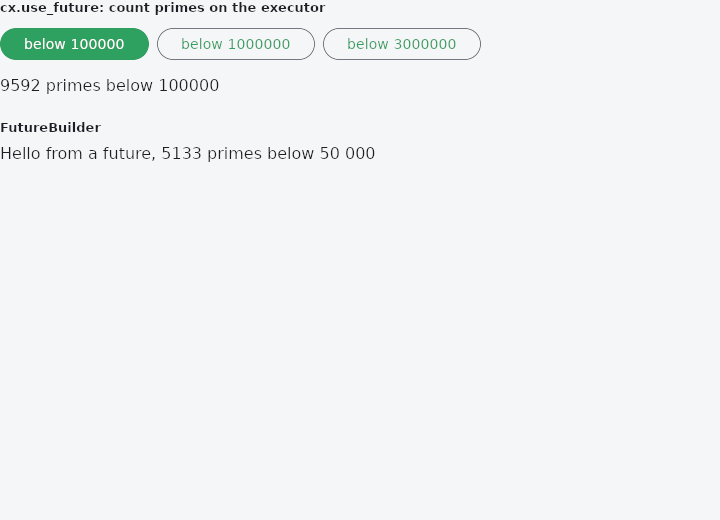
From frus-examples/widgets/src/features/state/widgets/future_builder.rs:
//! `use_future` and `FutureBuilder` — work that finishes later: start it once, show
//! "waiting" meanwhile, then the result. A rebuild does not start it again; a change of
//! its key (the dependencies) does.
//!
//! The future runs on the framework's executor natively (so it must be `Send`), and on
//! the browser's on the web. Work that can fail returns a `Result`, shown like any value.

use frus::{
    component, Align, AsyncSnapshot, Button, CircularProgressIndicator, Column, ConnectionState,
    FutureBuilder, Row, Text, Variant, Widget, Wrap,
};

use crate::common::shared::{section, sections};

const LIMITS: [usize; 3] = [100_000, 1_000_000, 3_000_000];

pub fn example() -> Box<dyn Widget> {
    Box::new(component(|cx| {
        let limit = cx.use_state(|| LIMITS[0]);
        let n = limit.get();

        // Keyed on `n`: picking another limit starts a new computation, and whatever the
        // old one gives is ignored.
        let snapshot = cx.use_future(n, move || async move { count_primes(n) });

        let picker = LIMITS
            .iter()
            .fold(Wrap::new().gap(8.0).run_gap(8.0), |row, &value| {
                let pick = limit.clone();
                row.child(
                    Button::new(format!("below {value}"))
                        .variant(if value == n {
                            Variant::Filled
                        } else {
                            Variant::Outlined
                        })
                        .on_press(move || pick.set(value)),
                )
            });

        sections(vec![
            Box::new(section(
                "cx.use_future: count primes on the executor",
                Column::new()
                    .spacing(12.0)
                    .cross_axis_alignment(Align::Start)
                    .child(picker)
                    .child(show(&snapshot, n)),
            )),
            // The same as a widget: the key, how to make the future, and how to build from
            // the snapshot.
            Box::new(section(
                "FutureBuilder",
                FutureBuilder::new(
                    "greeting",
                    |_: &&str| async {
                        format!(
                            "Hello from a future, {} primes below 50 000",
                            count_primes(50_000)
                        )
                    },
                    |_, snapshot| {
                        Box::new(Text::new(
                            snapshot.data.unwrap_or_else(|| "Working…".to_string()),
                        ))
                    },
                ),
            )),
        ])
    }))
}

/// What a snapshot looks like on screen, state by state.
fn show(snapshot: &AsyncSnapshot<usize>, n: usize) -> Box<dyn Widget> {
    match (snapshot.state, snapshot.data) {
        (ConnectionState::Done, Some(count)) => {
            Box::new(Text::new(format!("{count} primes below {n}")))
        }
        _ => Box::new(
            Row::new()
                .spacing(12.0)
                .cross_axis_alignment(Align::Center)
                .child(CircularProgressIndicator::new().size(20.0))
                .child(Text::new("Counting…")),
        ),
    }
}

/// How many primes are below `n` — a sieve, slow enough for big `n` to see the wait.
fn count_primes(n: usize) -> usize {
    if n < 3 {
        return 0;
    }
    let mut composite = vec![false; n];
    let mut count = 0;
    for i in 2..n {
        if !composite[i] {
            count += 1;
            let mut multiple = i * i;
            while multiple < n {
                composite[multiple] = true;
                multiple += i;
            }
        }
    }
    count
}
Properties
No builder methods: everything is set through the constructor.
Behaviour
use frus_widgets::{text, FutureBuilder};

let greeting = FutureBuilder::new(
    "en",
    |lang: &&str| {
        let lang = *lang;
        async move { if lang == "en" { "Hello" } else { "Bonjour" } }
    },
    |_, snapshot| Box::new(text(snapshot.data.unwrap_or("…"))),
);
The future starts once, and again only when key changes.
See also
- use_interval: a timer owned by a component, on for as long as builds ask for it.
- ValueNotifier, ChangeNotifier & their builders: state outside the widgets that tells whoever cares when it changed.
- use_stream & StreamBuilder: work that gives several values as it goes, then finishes.
- host::spawn & host::after: slow work on another thread, and something to do after a delay.
- keyed & Keyed: a stable identity, so a widget's state follows it when siblings move.
- The guide: Starting a frus application
- API reference:
FutureBuilder
Source: crates/frus-widgets/src/asyncbuild.rs @ e6fba33f5b42