host::spawn & host::after
Purpose
Slow work on another thread, and something to do after a delay.
Signature
This demo shows a pattern rather than one type. The names it uses are in the example below, and each one is in the API reference.
Example
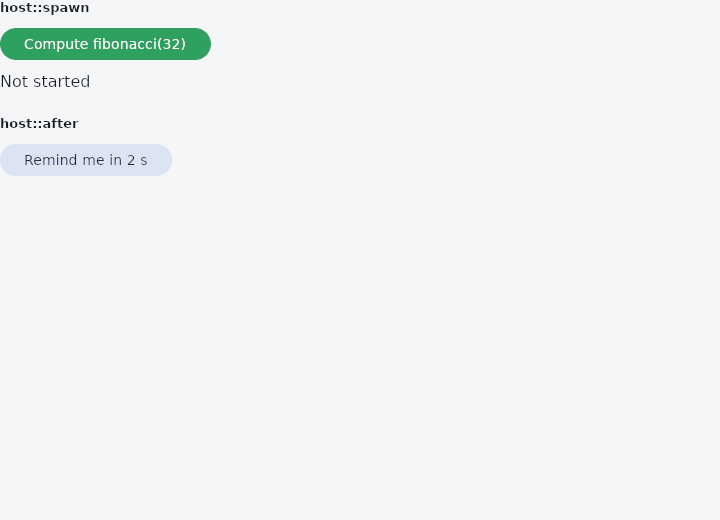
From frus-examples/widgets/src/features/state/widgets/host_tasks.rs:
//! `host::spawn` and `host::after` — run slow work on another thread and get its result
//! back on the interface's thread, or run something after a delay.
//!
//! Both can be called from any handler. The callback that receives the result runs on the
//! interface's thread, so it may change state like any other handler.

use std::time::Duration;

use frus::{component, host, Align, Button, Column, Row, Text, Variant, Widget};

use crate::common::shared::{section, sections};

pub fn example() -> Box<dyn Widget> {
    Box::new(component(|cx| {
        let result = cx.use_state(|| "Not started".to_string());
        let busy = cx.use_state(|| false);
        let reminder = cx.use_state(|| None::<String>);

        let (out, working) = (result.clone(), busy.clone());
        let start = move || {
            working.set(true);
            out.set("Working on another thread…".to_string());
            let (out, working) = (out.clone(), working.clone());
            host::spawn(
                // Runs off the interface's thread: it must not touch widgets or state.
                || fibonacci(32),
                // Runs back on the interface's thread, with what the work made.
                move |value| {
                    out.set(format!("fibonacci(32) = {value}"));
                    working.set(false);
                },
            );
        };

        let note = reminder.clone();
        let remind = move || {
            note.set(Some("Waiting two seconds…".to_string()));
            let note = note.clone();
            host::after(Duration::from_secs(2), move || {
                note.set(Some(
                    "Two seconds later: here is your reminder.".to_string(),
                ));
            });
        };

        sections(vec![
            Box::new(section(
                "host::spawn",
                Column::new()
                    .spacing(8.0)
                    .cross_axis_alignment(Align::Start)
                    .child(
                        Button::new("Compute fibonacci(32)")
                            .enabled(!busy.get())
                            .on_press(start),
                    )
                    .child(Text::new(result.get())),
            )),
            Box::new(section(
                "host::after",
                Row::new()
                    .spacing(12.0)
                    .cross_axis_alignment(Align::Center)
                    .child(
                        Button::new("Remind me in 2 s")
                            .variant(Variant::Tonal)
                            .on_press(remind),
                    )
                    .child(Text::new(reminder.get().unwrap_or_default()).size(13.0)),
            )),
        ])
    }))
}

/// Deliberately slow: the naive recursion, to give the thread something to do.
pub fn fibonacci(n: u32) -> u64 {
    if n < 2 {
        u64::from(n)
    } else {
        fibonacci(n - 1) + fibonacci(n - 2)
    }
}
Properties
See the example.
Behaviour
The example shows it at work; the API reference has every method.
See also
- use_future & FutureBuilder: work that finishes later: waiting, then the result.
- use_stream & StreamBuilder: work that gives several values as it goes, then finishes.
- keyed & Keyed: a stable identity, so a widget's state follows it when siblings move.
- Theme: reading the theme's colours and type, and switching light and dark.
- Themed & ThemeBuilder: a different theme, or part of one, for one part of the screen.
- The guide: Starting a frus application
Source: frus-examples/widgets/src/features/state/widgets/host_tasks.rs @ e6fba33f5b42